Unlock a world of possibilities! Login now and discover the exclusive benefits awaiting you.

- Qlik Community
- :
- All Forums
- :
- QlikView
- :
- MAX Date
- Subscribe to RSS Feed
- Mark Topic as New
- Mark Topic as Read
- Float this Topic for Current User
- Bookmark
- Subscribe
- Mute
- Printer Friendly Page

 dseelam
- Mark as New
- Bookmark
- Subscribe
- Mute
- Subscribe to RSS Feed
- Permalink
- Report Inappropriate Content
MAX Date
hello all,
I don't know how to put this in to question, please check the attachments first
results needed in QVW - I want to see only one A in the column test with max date as 1/2/2017
thanks,
D
Accepted Solutions

 sunny_talwar
- Mark as New
- Bookmark
- Subscribe
- Mute
- Subscribe to RSS Feed
- Permalink
- Report Inappropriate Content
Then use a left join with a flag
test:
LOAD test,
[receipt date],
sales
FROM
[TEST*.xlsx]
(ooxml, embedded labels, table is Sheet1);
Left Join (test)
load test,
Max([receipt date]) as [receipt date],
1 as Flag
Resident test
Group By test;
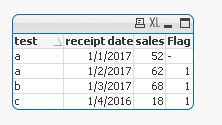
Now use the flag to restrict seeing the latest test value
sunny_talwar
- Mark as New
- Bookmark
- Subscribe
- Mute
- Subscribe to RSS Feed
- Permalink
- Report Inappropriate Content
Try this:
test:
LOAD test,
[receipt date],
sales
FROM
[TEST*.xlsx]
(ooxml, embedded labels, table is Sheet1);
Right Join (test)
load test,
Max([receipt date]) as [receipt date]
Resident test
Group By test;
dseelam
- Mark as New
- Bookmark
- Subscribe
- Mute
- Subscribe to RSS Feed
- Permalink
- Report Inappropriate Content
Sunny, thanks you for the reply
I just want to see max date on front end view, I don't want to avoid data coming in to data model bcoz I need history
sunny_talwar
- Mark as New
- Bookmark
- Subscribe
- Mute
- Subscribe to RSS Feed
- Permalink
- Report Inappropriate Content
Then use a left join with a flag
test:
LOAD test,
[receipt date],
sales
FROM
[TEST*.xlsx]
(ooxml, embedded labels, table is Sheet1);
Left Join (test)
load test,
Max([receipt date]) as [receipt date],
1 as Flag
Resident test
Group By test;
Now use the flag to restrict seeing the latest test value
