Unlock a world of possibilities! Login now and discover the exclusive benefits awaiting you.

- Qlik Community
- :
- All Forums
- :
- QlikView
- :
- Macros. Autofilter
- Subscribe to RSS Feed
- Mark Topic as New
- Mark Topic as Read
- Float this Topic for Current User
- Bookmark
- Subscribe
- Mute
- Printer Friendly Page

 MindaugasBacius
- Mark as New
- Bookmark
- Subscribe
- Mute
- Subscribe to RSS Feed
- Permalink
- Report Inappropriate Content
Macros. Autofilter
Hello,
I would like to filter out some values using Macros.
Unfortunately, I only manage to create a filter in excel but no luck with selecting the data in specified column.
How could I achieve my goals?
XLDoc.Sheets(1).Range("A1").AutoFilter
Thank you!
Accepted Solutions

 marcus_sommer
- Mark as New
- Bookmark
- Subscribe
- Mute
- Subscribe to RSS Feed
- Permalink
- Report Inappropriate Content
I think vbs goes straight through the order of parameters and didn't need / accept the parameter-names. I have now looked into a very old reporting of mine which worked at this time - here a snippet from them:
xlSheet.Activate
xlSheet.Cells(1, 1).Activate
xlSheet.Cells(1, 1).Autofilter 3, year(now() - 1)
xlSheet.Cells(1, 1).Autofilter 4, month(now() - 1)
xlSheet.Rows("2:" & xlZeile_1).Select
xlSheet.Rows("2:" & xlZeile_1).Delete
xlSheet.Cells(1, 1).Select
xlSheet.Cells(1, 1).Autofilter
- Marcus
marcus_sommer
- Mark as New
- Bookmark
- Subscribe
- Mute
- Subscribe to RSS Feed
- Permalink
- Report Inappropriate Content
I hope it's helpful: http://www.ozgrid.com/VBA/autofilter-vba-criteria.htm
- Marcus
MindaugasBacius
- Mark as New
- Bookmark
- Subscribe
- Mute
- Subscribe to RSS Feed
- Permalink
- Report Inappropriate Content
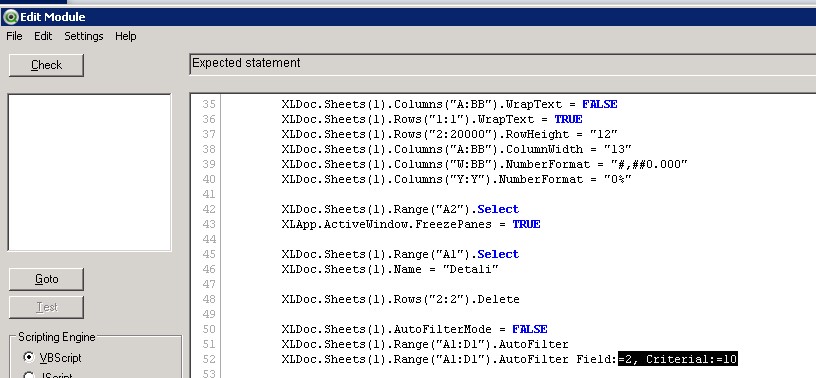
I've come across this site yesterday. Sadly, I've tried a lot of variations but with no result.
marcus_sommer
- Mark as New
- Bookmark
- Subscribe
- Mute
- Subscribe to RSS Feed
- Permalink
- Report Inappropriate Content
I think vbs goes straight through the order of parameters and didn't need / accept the parameter-names. I have now looked into a very old reporting of mine which worked at this time - here a snippet from them:
xlSheet.Activate
xlSheet.Cells(1, 1).Activate
xlSheet.Cells(1, 1).Autofilter 3, year(now() - 1)
xlSheet.Cells(1, 1).Autofilter 4, month(now() - 1)
xlSheet.Rows("2:" & xlZeile_1).Select
xlSheet.Rows("2:" & xlZeile_1).Delete
xlSheet.Cells(1, 1).Select
xlSheet.Cells(1, 1).Autofilter
- Marcus
MindaugasBacius
- Mark as New
- Bookmark
- Subscribe
- Mute
- Subscribe to RSS Feed
- Permalink
- Report Inappropriate Content
I did manage to do this!
XLDoc.Sheets(1).Rows("1:1").AutoFilter 13, "<>0"
Thank you Marcus for your professional help!
