Unlock a world of possibilities! Login now and discover the exclusive benefits awaiting you.

- Qlik Community
- :
- All Forums
- :
- QlikView
- :
- Make a backup before Reload
- Subscribe to RSS Feed
- Mark Topic as New
- Mark Topic as Read
- Float this Topic for Current User
- Bookmark
- Subscribe
- Mute
- Printer Friendly Page

- Mark as New
- Bookmark
- Subscribe
- Mute
- Subscribe to RSS Feed
- Permalink
- Report Inappropriate Content
Make a backup before Reload
Hi all, I have a task to modify the report so that before reload it will make a copy of itself as a backup into another folder. I have no idea now to start this. Do you think this can be done??
Accepted Solutions
- Mark as New
- Bookmark
- Subscribe
- Mute
- Subscribe to RSS Feed
- Permalink
- Report Inappropriate Content
Thank you so much! But I cannot just make a simple backup. In fact, I have to save a copy at every reload because once the reload completed, the data in the report will be changed.
In the end I found this "EXECUTE" statement which solved my problem.
So what i do is at the beginning of the Load script Execute a command line to copy the report file. the script looks like this:
Let vReportFile = ' " '& DocumentPath( ) & ' " '; // This is report full path
Let vCopyReport = ' " C:\BackupFolder\' //the backup folder
& Left(DocumentName(),len(DocumentName())-4) // Remove the ".qvw"
& '_' & Date(now(), 'YYYY_MM_DD') // Put in the date
& '-' & time(now(), 'hhmmss') &'.qvw" '; //Put in the time and file extension
EXECUTE cmd.exe /c copy $(vReportFile) $(vCopyReport);
So far it's working fine on the server. 

 VishalWaghole
- Mark as New
- Bookmark
- Subscribe
- Mute
- Subscribe to RSS Feed
- Permalink
- Report Inappropriate Content
Hi,
PFA image,
Go to User preferences -> under save tab -> enable Use backup.
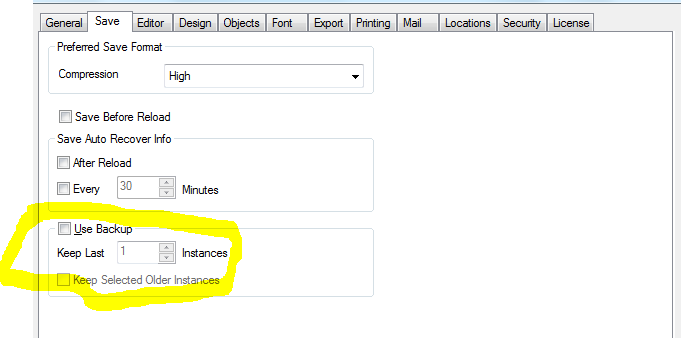
Hope this will solve your problem.
-- Regards,
Vishal Waghole
VishalWaghole
- Mark as New
- Bookmark
- Subscribe
- Mute
- Subscribe to RSS Feed
- Permalink
- Report Inappropriate Content
Setting -> User preferences -> under save tab -> then enable Use backup.
- Mark as New
- Bookmark
- Subscribe
- Mute
- Subscribe to RSS Feed
- Permalink
- Report Inappropriate Content
Thank you so much! But I cannot just make a simple backup. In fact, I have to save a copy at every reload because once the reload completed, the data in the report will be changed.
In the end I found this "EXECUTE" statement which solved my problem.
So what i do is at the beginning of the Load script Execute a command line to copy the report file. the script looks like this:
Let vReportFile = ' " '& DocumentPath( ) & ' " '; // This is report full path
Let vCopyReport = ' " C:\BackupFolder\' //the backup folder
& Left(DocumentName(),len(DocumentName())-4) // Remove the ".qvw"
& '_' & Date(now(), 'YYYY_MM_DD') // Put in the date
& '-' & time(now(), 'hhmmss') &'.qvw" '; //Put in the time and file extension
EXECUTE cmd.exe /c copy $(vReportFile) $(vCopyReport);
So far it's working fine on the server.