Unlock a world of possibilities! Login now and discover the exclusive benefits awaiting you.

- Qlik Community
- :
- All Forums
- :
- QlikView
- :
- Master Calendar help!
- Subscribe to RSS Feed
- Mark Topic as New
- Mark Topic as Read
- Float this Topic for Current User
- Bookmark
- Subscribe
- Mute
- Printer Friendly Page

- Mark as New
- Bookmark
- Subscribe
- Mute
- Subscribe to RSS Feed
- Permalink
- Report Inappropriate Content
Master Calendar help!
All,
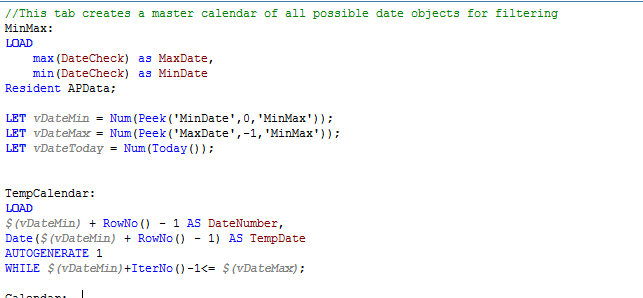
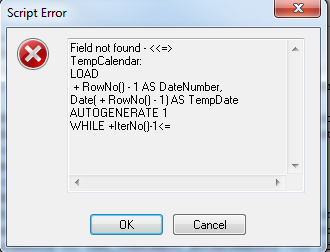
I've used this master calendar for ~20 of my clients, but I cannot seem to figure out why this keeps erroring out. Let me know if you have any suggestions.
- Tags:
- calendar help
- « Previous Replies
-
- 1
- 2
- Next Replies »
Accepted Solutions

 rwunderlich
- Mark as New
- Bookmark
- Subscribe
- Mute
- Subscribe to RSS Feed
- Permalink
- Report Inappropriate Content
I looks like you have a "QUALIFY *" statement on the previous tab -- without an "UNQUALIFY *".
-Rob
 maxgro
- Mark as New
- Bookmark
- Subscribe
- Mute
- Subscribe to RSS Feed
- Permalink
- Report Inappropriate Content
Empty APData table?
- Mark as New
- Bookmark
- Subscribe
- Mute
- Subscribe to RSS Feed
- Permalink
- Report Inappropriate Content
No its pulling 267,000 lines from the APData table which is pulling from a qvd.
- Mark as New
- Bookmark
- Subscribe
- Mute
- Subscribe to RSS Feed
- Permalink
- Report Inappropriate Content
The only difference in the data with this client is there is only one year of data -- 2015, where we usually have 2-3 years, could this be the issue?
 sunny_talwar
- Mark as New
- Bookmark
- Subscribe
- Mute
- Subscribe to RSS Feed
- Permalink
- Report Inappropriate Content
I have run into this issue few times. I would check if QlikView understands the DateCheck as date. It might be read as date or DateCheck may be completely blank.
sunny_talwar
- Mark as New
- Bookmark
- Subscribe
- Mute
- Subscribe to RSS Feed
- Permalink
- Report Inappropriate Content
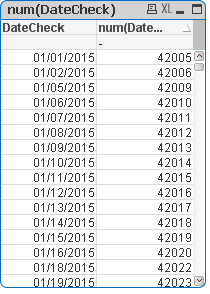
Can you try reloading the qvd without mastercalendar script and create a straight table with this:
Dimension: DateCheck
Expression: Num(DateCheck)
Just to make sure that date is read as a date field by QlikView.
- Mark as New
- Bookmark
- Subscribe
- Mute
- Subscribe to RSS Feed
- Permalink
- Report Inappropriate Content
sunny_talwar
- Mark as New
- Bookmark
- Subscribe
- Mute
- Subscribe to RSS Feed
- Permalink
- Report Inappropriate Content
Can you try the variable like this:
LET vMaxDate = Peek('MaxDate');
LET vMinDate = Peek('MinDate');
- Mark as New
- Bookmark
- Subscribe
- Mute
- Subscribe to RSS Feed
- Permalink
- Report Inappropriate Content
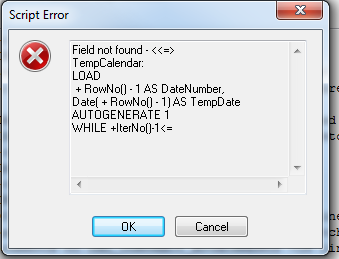
Same error as before..
rwunderlich
- Mark as New
- Bookmark
- Subscribe
- Mute
- Subscribe to RSS Feed
- Permalink
- Report Inappropriate Content
It looks like both your peek() statements are returning null. Exit the script after creating the MinMax table and see what's in the table.
-Rob
- « Previous Replies
-
- 1
- 2
- Next Replies »