Unlock a world of possibilities! Login now and discover the exclusive benefits awaiting you.

- Qlik Community
- :
- All Forums
- :
- QlikView
- :
- Matching values from one column to another
- Subscribe to RSS Feed
- Mark Topic as New
- Mark Topic as Read
- Float this Topic for Current User
- Bookmark
- Subscribe
- Mute
- Printer Friendly Page

 rsdhavle
- Mark as New
- Bookmark
- Subscribe
- Mute
- Subscribe to RSS Feed
- Permalink
- Report Inappropriate Content
Matching values from one column to another
I have two columns A and B. I want to show only those values from Column A which are available in Column B. How can i do that. Which function can be used?

 tresB
tresB
- Mark as New
- Bookmark
- Subscribe
- Mute
- Subscribe to RSS Feed
- Permalink
- Report Inappropriate Content
In the script use Exists(), like:
Load
A,
B
From <> where exists(B,A):
rsdhavle
- Mark as New
- Bookmark
- Subscribe
- Mute
- Subscribe to RSS Feed
- Permalink
- Report Inappropriate Content
Can we control it at Object level? I dont want to restrict values at main script level.
tresB
- Mark as New
- Bookmark
- Subscribe
- Mute
- Subscribe to RSS Feed
- Permalink
- Report Inappropriate Content
Listbox? Chart? Could you explain the scenario better?

 simenkg
- Mark as New
- Bookmark
- Subscribe
- Mute
- Subscribe to RSS Feed
- Permalink
- Report Inappropriate Content
how about doing something like this
Table1:
Load A, B from File.qvd (qvd)
left join(Table1)
load B as A, 1 as ValidFlag from File.qvd (qvd);
then you can select ValidFlag = 1 in the front end or use set analysis with {<ValidFlag = {1}>}
rsdhavle
- Mark as New
- Bookmark
- Subscribe
- Mute
- Subscribe to RSS Feed
- Permalink
- Report Inappropriate Content
yes i am doing it in straight table chart
 ashfaq_haseeb
- Mark as New
- Bookmark
- Subscribe
- Mute
- Subscribe to RSS Feed
- Permalink
- Report Inappropriate Content
Hi,
May be like this.
Regards
ASHFAQ

 MarcoWedel
- Mark as New
- Bookmark
- Subscribe
- Mute
- Subscribe to RSS Feed
- Permalink
- Report Inappropriate Content
another one in front end only:
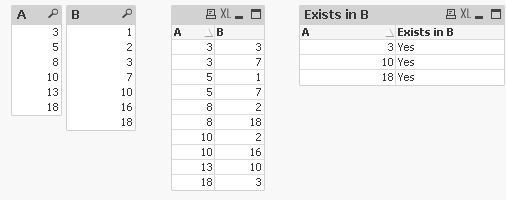
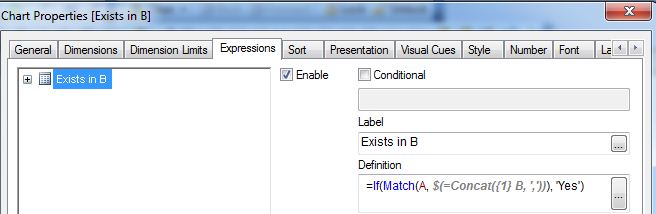
hope this helps
regards
Marco
rsdhavle
- Mark as New
- Bookmark
- Subscribe
- Mute
- Subscribe to RSS Feed
- Permalink
- Report Inappropriate Content
You have written the condition in expression part..Lets say i want to control it at Dimension level then writing =If(Match(A, $(=Concat({1} B, ','))), A) will work?
As i need to display filtered A values in chart
