Unlock a world of possibilities! Login now and discover the exclusive benefits awaiting you.

- Qlik Community
- :
- All Forums
- :
- QlikView
- :
- Max(date) in set analysis
- Subscribe to RSS Feed
- Mark Topic as New
- Mark Topic as Read
- Float this Topic for Current User
- Bookmark
- Subscribe
- Mute
- Printer Friendly Page

 axnvazquez
- Mark as New
- Bookmark
- Subscribe
- Mute
- Subscribe to RSS Feed
- Permalink
- Report Inappropriate Content
Max(date) in set analysis
Hi everyone ! I need help with this issue, because i had dates for each costumer sale, but in my table I need to get the sale of the last sale - max(date)
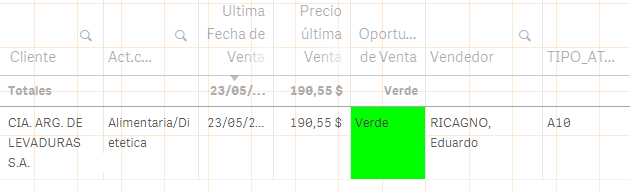
This is the function wich calculates the price for the las sale :
sum({$< _PITR_TYMTD={1} , Origen_Dato={'Real'}, Mes=, Año=>} DCVC_TOTR_LOC_SIMP) /
Sum({$< _PITR_TYMTD={1} , Origen_Dato={'Real'} ,Mes= , Año=>} DCVC_PESO)/20
But I need to set the last date, so i made the variable UltimaFecha =MAX({$<DCVC_TOTR_LOC_SIMP = {">=0"}, Mes=,Año=> } [%FECHA])
But i tried so many ways to set that date in the set analysis for the sum, but i cant display it .
I tried month, year, etc
Any help will be so helpfull !
Regards !

- Mark as New
- Bookmark
- Subscribe
- Mute
- Subscribe to RSS Feed
- Permalink
- Report Inappropriate Content
You can use like below. Don't worry about Errors due to this is bug. May be next version they may released
sum({$< _PITR_TYMTD={1} , $(UltimaFecha), Origen_Dato={'Real'}, Mes=, Año=>} DCVC_TOTR_LOC_SIMP) /
Sum({$< _PITR_TYMTD={1} , $(UltimaFecha), Origen_Dato={'Real'} ,Mes= , Año=>} DCVC_PESO)/20

 Kushal_Chawda
- Mark as New
- Bookmark
- Subscribe
- Mute
- Subscribe to RSS Feed
- Permalink
- Report Inappropriate Content
try this
I have assumed date format "MM/DD/YYYY". Please give actual date format if field [%FECHA]
sum({$< _PITR_TYMTD={1} , Origen_Dato={'Real'},[%FECHA]={"$(=date(MAX({$<DCVC_TOTR_LOC_SIMP = {">=0"}, Mes=,Año=> } [%FECHA]),'MM/DD/YYYY'))"}, Mes=, Año=>} DCVC_TOTR_LOC_SIMP) /
Sum({$< _PITR_TYMTD={1} , Origen_Dato={'Real'} ,[%FECHA]={"$(=date(MAX({$<DCVC_TOTR_LOC_SIMP = {">=0"}, Mes=,Año=> } [%FECHA]),'MM/DD/YYYY'))"},Mes= , Año=>} DCVC_PESO)/20
axnvazquez
- Mark as New
- Bookmark
- Subscribe
- Mute
- Subscribe to RSS Feed
- Permalink
- Report Inappropriate Content
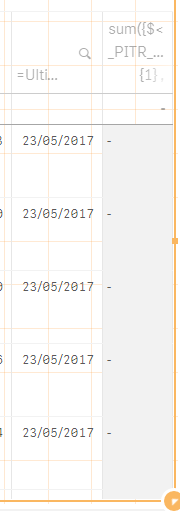
Hi Anil ! thanks for the reply ! I tried the expression that you give, but is not displaying any value.
- Mark as New
- Bookmark
- Subscribe
- Mute
- Subscribe to RSS Feed
- Permalink
- Report Inappropriate Content
Will you available to provide QVF file to check?
axnvazquez
- Mark as New
- Bookmark
- Subscribe
- Mute
- Subscribe to RSS Feed
- Permalink
- Report Inappropriate Content
Anil, I can't provide de QVF file, sory  i am not allowed to do that .
I tried to do something like this
sum({$< _PITR_TYMTD={1} , [%FECHA]={$(=UltimaFecha)}>}, Origen_Dato={'Real'}, Mes=, Año=>} DCVC_TOTR_LOC_SIMP) /
Sum({$< _PITR_TYMTD={1} ,[%FECHA]={$(=UltimaFecha)}>}, Origen_Dato={'Real'} ,Mes= , Año=>} DCVC_PESO)/20
But it doesn't work
