Unlock a world of possibilities! Login now and discover the exclusive benefits awaiting you.

Announcements
Share your agentic AI experience, learn from others, and earn a new badge: Put Agentic AI to Work
- Qlik Community
- :
- All Forums
- :
- QlikView
- :
- Merge heading in pivot table
Options
- Subscribe to RSS Feed
- Mark Topic as New
- Mark Topic as Read
- Float this Topic for Current User
- Bookmark
- Subscribe
- Mute
- Printer Friendly Page
Turn on suggestions
Auto-suggest helps you quickly narrow down your search results by suggesting possible matches as you type.
Showing results for

Anonymous
Not applicable
2015-09-05
06:48 PM
- Mark as New
- Bookmark
- Subscribe
- Mute
- Subscribe to RSS Feed
- Permalink
- Report Inappropriate Content
Merge heading in pivot table
Actually I used text object with the following expressions = Max(Year) &' / ' & Max(Year-1) and =Max(Year) &' / BUDGET'
I am trying to add heading in pivot table .

I read the following post but I didn't undestand how to use it in my case ?
- Tags:
- new_to_qlikview
609 Views
1 Reply

 sinanozdemir
Specialist III
2015-09-06
02:35 PM
- Mark as New
- Bookmark
- Subscribe
- Mute
- Subscribe to RSS Feed
- Permalink
- Report Inappropriate Content
Hi,
Maybe something like this:
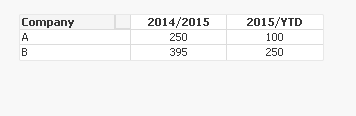
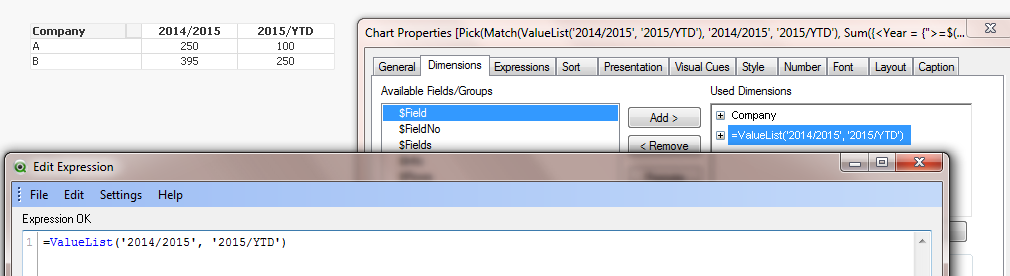
I used ValueList() in one of the dimensions:
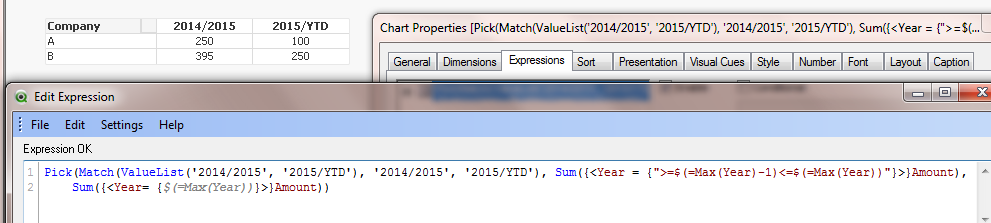
And in the expression, I used Pick(), Match() and ValueList() all together:
I am also attaching the qvw in case you need that as well.
Hope this helps.