Unlock a world of possibilities! Login now and discover the exclusive benefits awaiting you.

- Qlik Community
- :
- All Forums
- :
- QlikView
- :
- Merging rows in a straight table
Options
- Subscribe to RSS Feed
- Mark Topic as New
- Mark Topic as Read
- Float this Topic for Current User
- Bookmark
- Subscribe
- Mute
- Printer Friendly Page
Turn on suggestions
Auto-suggest helps you quickly narrow down your search results by suggesting possible matches as you type.
Showing results for

Not applicable
2017-03-30
08:22 AM
- Mark as New
- Bookmark
- Subscribe
- Mute
- Subscribe to RSS Feed
- Permalink
- Report Inappropriate Content
Merging rows in a straight table
Hi Folks,
I have the following requirement which I need to complete. It is :
I have the following straight table :
| Header 1 | Header 2 |
|---|---|
| A | 12 |
| B | 10 |
| C | 15 |
| B | 20 |
| A | 25 |
| D | 30 |
| A | 40 |
| B | 50 |
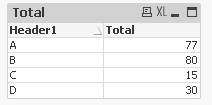
I need the output as
| Header 1 | Header 2 |
|---|---|
| A | 77 |
| B | 80 |
| C | 15 |
| D | 30 |
where header 1 is a dimension and header 2 values are measures.
And values of all the measures are either stored in variables or expressions in another part of staging.
How to do that?
Please share your thoughts.@
1,053 Views
1 Reply

 vishsaggi
Champion III
2017-03-30
12:08 PM
- Mark as New
- Bookmark
- Subscribe
- Mute
- Subscribe to RSS Feed
- Permalink
- Report Inappropriate Content
What is the issue here?
Use straight table,
Dim: Header1
expr: Sum(Header2)
Then for expr in expression tab use No Totals from the Total Mode you can see that in bottom right corner .