Unlock a world of possibilities! Login now and discover the exclusive benefits awaiting you.

- Qlik Community
- :
- All Forums
- :
- QlikView
- :
- Metadata handling not working properly
- Subscribe to RSS Feed
- Mark Topic as New
- Mark Topic as Read
- Float this Topic for Current User
- Bookmark
- Subscribe
- Mute
- Printer Friendly Page

 Siva_Sankar
- Mark as New
- Bookmark
- Subscribe
- Mute
- Subscribe to RSS Feed
- Permalink
- Report Inappropriate Content
Metadata handling not working properly
Hi,
I have gone through Handling Metadata in QlikView by sinanozdemir and when I try to implement it ,it works for some tables and not for some.
I have attached a application.
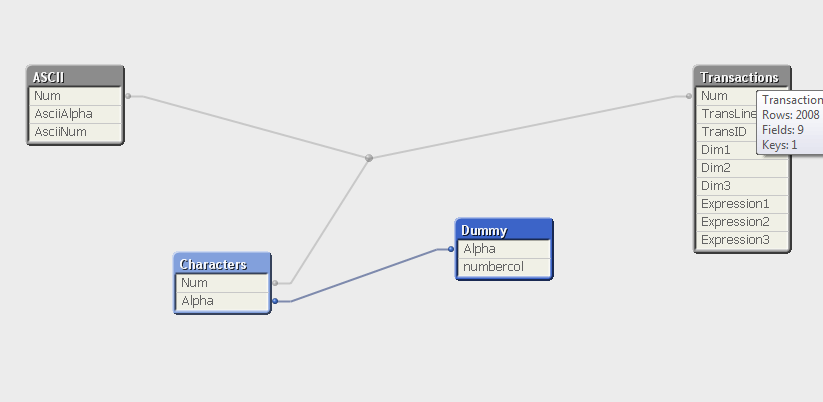
Can any one look and see and let me know why is it?
Regards,
Sivasankar
- Tags:
- new_to_qlikview
Siva_Sankar
- Mark as New
- Bookmark
- Subscribe
- Mute
- Subscribe to RSS Feed
- Permalink
- Report Inappropriate Content
Tamil Nagaraj,
That is the issue. Why should I break the link between the tables? What is the logic behind comments?
What is the limitation of using comments?
Regards,
Siva Sankar

 tamilarasu
- Mark as New
- Bookmark
- Subscribe
- Mute
- Subscribe to RSS Feed
- Permalink
- Report Inappropriate Content
Hi Shankar,
I am not sure about the limitation. If you move the character table script below ASCII table or somewhere, the comments are displayed correctly. I am not sure why the Character table is causing the problem. Maybe someone might have answer for this.
Check the below attachment.
Siva_Sankar
- Mark as New
- Bookmark
- Subscribe
- Mute
- Subscribe to RSS Feed
- Permalink
- Report Inappropriate Content
Find the attachment, I have included one more table. now the comments are gone again.

 Kushal_Chawda
- Mark as New
- Bookmark
- Subscribe
- Mute
- Subscribe to RSS Feed
- Permalink
- Report Inappropriate Content
This script is working fine for me & I can see the comments
QV version - 11.2 SR12
[Table map]:
Mapping LOAD * INLINE
[
Table,Description
ASCII, Contains ASCII Values
Characters, Contains Characters
Transactions, Contains Transaction Facts
Dummy, dummies values
];
ASCII:
Load
if(RecNo()>=65 and RecNo()<=90,RecNo()-64) as Num,
Chr(RecNo()) as AsciiAlpha,
RecNo() as AsciiNum
autogenerate 255
Where (RecNo()>=32 and RecNo()<=126) or RecNo()>=160 ;
Characters:
Load Chr(RecNo()+Ord('A')-1) as Alpha, RecNo() as Num autogenerate 26;
Transactions:
Load
TransLineID,
TransID,
mod(TransID,26)+1 as Num,
Pick(Ceil(3*Rand1),'A','B','C') as Dim1,
Pick(Ceil(6*Rand1),'a','b','c','d','e','f') as Dim2,
Pick(Ceil(3*Rand()),'X','Y','Z') as Dim3,
Round(1000*Rand()*Rand()*Rand1) as Expression1,
Round( 10*Rand()*Rand()*Rand1) as Expression2,
Round(Rand()*Rand1,0.00001) as Expression3;
Load
Rand() as Rand1,
IterNo() as TransLineID,
RecNo() as TransID
Autogenerate 1000
While Rand()<=0.5 or IterNo()=1;
Dummy:
Load * inline
[
Alpha,numbercol
sadsad,123123123
qewqeqwe,123123123
];
Comment Tables using [Table map];
Siva_Sankar
- Mark as New
- Bookmark
- Subscribe
- Mute
- Subscribe to RSS Feed
- Permalink
- Report Inappropriate Content
What changes you have to do with actual scrip to make the comments appear?
tamilarasu
- Mark as New
- Bookmark
- Subscribe
- Mute
- Subscribe to RSS Feed
- Permalink
- Report Inappropriate Content
I did some tests but no luck. If I add one more table, it's not showing the comments for one table.
Kushal_Chawda
- Mark as New
- Bookmark
- Subscribe
- Mute
- Subscribe to RSS Feed
- Permalink
- Report Inappropriate Content
I have not done any changes just did ordering as per the inline table. I added one more table Test in inline & in actual load and I can see the comments
Siva_Sankar
- Mark as New
- Bookmark
- Subscribe
- Mute
- Subscribe to RSS Feed
- Permalink
- Report Inappropriate Content
I tried using the same ordering with an additional table. Not working as expected.
Table_map:
Mapping LOAD * INLINE
[
Table,Description
ASCII, Contains ASCII Values
Transactions, Contains Transaction Facts
Dummy, dummies values
Test3,Transactional datas
Characters, Contains Characters
];
[ASCII]:
Load
if(RecNo()>=65 and RecNo()<=90,RecNo()-64) as Num,
Chr(RecNo()) as AsciiAlpha,
RecNo() as AsciiNum
autogenerate 255
Where (RecNo()>=32 and RecNo()<=126) or RecNo()>=160 ;
Transactions:
Load
TransLineID,
TransID,
mod(TransID,26)+1 as Num,
Pick(Ceil(3*Rand1),'A','B','C') as Dim1,
Pick(Ceil(6*Rand1),'a','b','c','d','e','f') as Dim2,
Pick(Ceil(3*Rand()),'X','Y','Z') as Dim3,
Round(1000*Rand()*Rand()*Rand1) as Expression1,
Round( 10*Rand()*Rand()*Rand1) as Expression2,
Round(Rand()*Rand1,0.00001) as Expression3;
Load
Rand() as Rand1,
IterNo() as TransLineID,
RecNo() as TransID
Autogenerate 1000
While Rand()<=0.5 or IterNo()=1;
Dummy:
Load * inline
[
Alpha,numbercol
sadsad,123123123
qewqeqwe,123123123
];
Test3:
Load * inline
[
TransID,Data
1123,40000
1223,20000
];
Characters:
Load Chr(RecNo()+Ord('A')-1) as Alpha, RecNo() as Num autogenerate 26;
Comment Tables using Table_map;
Regards,
Siva Sankar
Kushal_Chawda
- Mark as New
- Bookmark
- Subscribe
- Mute
- Subscribe to RSS Feed
- Permalink
- Report Inappropriate Content
I think there is a bug with comment statement
because normal comment statement also not working as below
Comment Table Test3 with 'Test 3 table'

 sinanozdemir
- Mark as New
- Bookmark
- Subscribe
- Mute
- Subscribe to RSS Feed
- Permalink
- Report Inappropriate Content
Put Dummy and Test3 tables after Characters table:
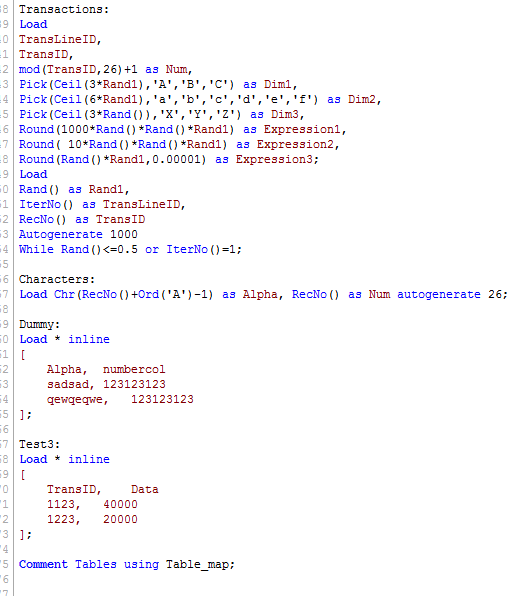
The problem seems to be with Characters table and I cannot exactly say why.
