Unlock a world of possibilities! Login now and discover the exclusive benefits awaiting you.

- Qlik Community
- :
- All Forums
- :
- QlikView
- :
- Modify the total of straight table
- Subscribe to RSS Feed
- Mark Topic as New
- Mark Topic as Read
- Float this Topic for Current User
- Bookmark
- Subscribe
- Mute
- Printer Friendly Page

- Mark as New
- Bookmark
- Subscribe
- Mute
- Subscribe to RSS Feed
- Permalink
- Report Inappropriate Content
Modify the total of straight table
Hi,
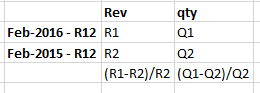
I am trying to modify the totals of a straight table.
Basically i have a straight table with one dimension(the dimension has only 2 values) and 4 expressions.
this is a YoY comparison.
instead of totals at the bottom i want the percentage increase as shown below

 swuehl
- Mark as New
- Bookmark
- Subscribe
- Mute
- Subscribe to RSS Feed
- Permalink
- Report Inappropriate Content
Try something like this in your expressions:
=If(Dimensionality()=0,
YourPercentageIncreaseExpressionInTotalLine,
YourDetailsLineExpression
)

 satishkurra
- Mark as New
- Bookmark
- Subscribe
- Mute
- Subscribe to RSS Feed
- Permalink
- Report Inappropriate Content
Use the below expression
if(Dimensionality()>0,
sum(SalesAmount),
Num(sum(SalesAmount),'#,##0.00%'))
Set the expression to default in Number Tab
satishkurra
- Mark as New
- Bookmark
- Subscribe
- Mute
- Subscribe to RSS Feed
- Permalink
- Report Inappropriate Content
Sorry, i didn't see when replying the question, i see after submitting, Apology
swuehl
- Mark as New
- Bookmark
- Subscribe
- Mute
- Subscribe to RSS Feed
- Permalink
- Report Inappropriate Content
No problem, that happens quite often because it's hard to see if there are replies coming in while typing.
Keep on Qliking...
- Mark as New
- Bookmark
- Subscribe
- Mute
- Subscribe to RSS Feed
- Permalink
- Report Inappropriate Content
This group is awesome.
- Mark as New
- Bookmark
- Subscribe
- Mute
- Subscribe to RSS Feed
- Permalink
- Report Inappropriate Content
That works, i tested with the values hardcoded, but another issue that i have is that i am using calculated dimension. how can I refer it in expression.