Unlock a world of possibilities! Login now and discover the exclusive benefits awaiting you.

- Qlik Community
- :
- All Forums
- :
- QlikView
- :
- Month not reflects date
- Subscribe to RSS Feed
- Mark Topic as New
- Mark Topic as Read
- Float this Topic for Current User
- Bookmark
- Subscribe
- Mute
- Printer Friendly Page

 nareshthavidish
- Mark as New
- Bookmark
- Subscribe
- Mute
- Subscribe to RSS Feed
- Permalink
- Report Inappropriate Content
Month not reflects date
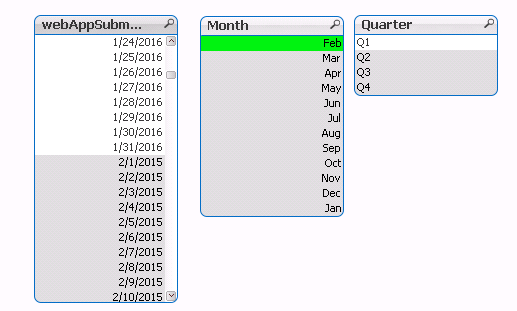
Hi the user financial year is fro FEB to JAN
so i have created month start from FEB
but it doesn't reflects the date means if i click on FEB month it gives JAN data as below for your reference,
- « Previous Replies
-
- 1
- 2
- Next Replies »
Accepted Solutions
 renuka_sasikuma
- Mark as New
- Bookmark
- Subscribe
- Mute
- Subscribe to RSS Feed
- Permalink
- Report Inappropriate Content
Hi
Check this attachment which will be useful for you.
Its a Master Calendar.
Regards,
Renuka S
renuka_sasikuma- Mark as New
- Bookmark
- Subscribe
- Mute
- Subscribe to RSS Feed
- Permalink
- Report Inappropriate Content
Hi
First derive one variable
LET vFM = 2;
And then in your Load statement use this
Mod(If(Len(Num(Month(Date)))<2,0 & Num(Month(Date)),Num(Month(Date))) - $(vFM), 12)+1 as fMonth
This will give you financial year starting from Feb.
Regards,
Renuka S
renuka_sasikuma- Mark as New
- Bookmark
- Subscribe
- Mute
- Subscribe to RSS Feed
- Permalink
- Report Inappropriate Content
Hi
Check this attachment which will be useful for you.
Its a Master Calendar.
Regards,
Renuka S
nareshthavidish- Mark as New
- Bookmark
- Subscribe
- Mute
- Subscribe to RSS Feed
- Permalink
- Report Inappropriate Content
Thanks Renuka ,but what about the quarter
renuka_sasikuma- Mark as New
- Bookmark
- Subscribe
- Mute
- Subscribe to RSS Feed
- Permalink
- Report Inappropriate Content
Most welcome Naresh.
Check in attachment everything you have in it.
Just use your field name instead of Date.
'Q' & Ceil((Mod(If(Len(Num(Month(Date)))<2,0 & Num(Month(Date)),Num(Month(Date))) - $(vFM), 12)+1)/3) as Quarter,
Year(Date) + If(If(Len(Num(Month(Date)))<2,0 & Num(Month(Date)),Num(Month(Date))) > =$(vFM), 1, 0)-1 as fYear,
Hope you got it

 sunny_talwar
- Mark as New
- Bookmark
- Subscribe
- Mute
- Subscribe to RSS Feed
- Permalink
- Report Inappropriate Content
Also look at the blog for tips to create fiscal calendar:
nareshthavidish- Mark as New
- Bookmark
- Subscribe
- Mute
- Subscribe to RSS Feed
- Permalink
- Report Inappropriate Content
Hi am getting months as 1,2,3,4,....12 i need to show month names 1=feb,2=mar,.....12=Jan
sunny_talwar
- Mark as New
- Bookmark
- Subscribe
- Mute
- Subscribe to RSS Feed
- Permalink
- Report Inappropriate Content
Is it still not working based on Renuka's responses? Have you looked at the second link I shared. jagan has provided the script to create a fiscal calendar. Try it out.
renuka_sasikuma- Mark as New
- Bookmark
- Subscribe
- Mute
- Subscribe to RSS Feed
- Permalink
- Report Inappropriate Content
Derive Month(Date) as MonthName along with the above expression.
If possible post your app.
Regards,
Renuka S

 senpradip007
- Mark as New
- Bookmark
- Subscribe
- Mute
- Subscribe to RSS Feed
- Permalink
- Report Inappropriate Content
Have look at this.

- « Previous Replies
-
- 1
- 2
- Next Replies »