Unlock a world of possibilities! Login now and discover the exclusive benefits awaiting you.

- Qlik Community
- :
- All Forums
- :
- QlikView
- :
- Month
- Subscribe to RSS Feed
- Mark Topic as New
- Mark Topic as Read
- Float this Topic for Current User
- Bookmark
- Subscribe
- Mute
- Printer Friendly Page

 NavinReddy
- Mark as New
- Bookmark
- Subscribe
- Mute
- Subscribe to RSS Feed
- Permalink
- Report Inappropriate Content
Month
Dear All,
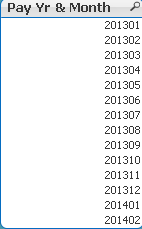
Please find the image
In this i want to fetch only 2014 ,Feb Data as Current month
for that month i should took only FEB,
Please create a variable that shows only Feb
=Sum({1<Month={"<=$(=Max(Month))"},Year={'2014'}>}PAY_AMT)
This expression Im getting Both the Months Data How can i Fetch only FEB
Please Help Some one
Thanks In Advance
Niru

 maxgro
- Mark as New
- Bookmark
- Subscribe
- Mute
- Subscribe to RSS Feed
- Permalink
- Report Inappropriate Content
=Sum({1<Month={FEB},Year={'2014'}>}PAY_AMT)

 Gysbert_Wassena
- Mark as New
- Bookmark
- Subscribe
- Mute
- Subscribe to RSS Feed
- Permalink
- Report Inappropriate Content
Change Month={"<=$(=Max(Month))"} into Month={"$(=Max(Month))"}. The <= means smaller or equal. You want an exact match so don't use the <= comparison operator.
talk is cheap, supply exceeds demand

 swuehl
- Mark as New
- Bookmark
- Subscribe
- Mute
- Subscribe to RSS Feed
- Permalink
- Report Inappropriate Content
Just change the smaller equal to an equal comparison or
=Sum({1<Month={'$(=Max(Month))'},Year={'2014'}>} PAY_AMT)
NavinReddy
- Mark as New
- Bookmark
- Subscribe
- Mute
- Subscribe to RSS Feed
- Permalink
- Report Inappropriate Content
No it will change month automatically
there i need to use variable only
