Unlock a world of possibilities! Login now and discover the exclusive benefits awaiting you.

- Qlik Community
- :
- All Forums
- :
- QlikView
- :
- Re: Monthstart and Monthend
- Subscribe to RSS Feed
- Mark Topic as New
- Mark Topic as Read
- Float this Topic for Current User
- Bookmark
- Subscribe
- Mute
- Printer Friendly Page

- Mark as New
- Bookmark
- Subscribe
- Mute
- Subscribe to RSS Feed
- Permalink
- Report Inappropriate Content
Monthstart and Monthend
Hi All,
Can anyone help me in getting the below calculation,
Count({<Date=Monthstart(Date)>}empid)
As per my requirement i should get the sum(Count of Employees in Monthstart of every Month. and month end of every month)
Regards,
Priyanka
- « Previous Replies
-
- 1
- 2
- Next Replies »
- Mark as New
- Bookmark
- Subscribe
- Mute
- Subscribe to RSS Feed
- Permalink
- Report Inappropriate Content
Hi Joe,
That was realy helpful.But Monthend Count is not showing properly.Month end count shows total emp id count.
- Mark as New
- Bookmark
- Subscribe
- Mute
- Subscribe to RSS Feed
- Permalink
- Report Inappropriate Content
Hi Anadh,
That works for monthstart .But Monthend count shows 0 value.Monthend has values.

 its_anandrjs
- Mark as New
- Bookmark
- Subscribe
- Mute
- Subscribe to RSS Feed
- Permalink
- Report Inappropriate Content
Hi,
In Monthend expression write
=Count( if( trim(Date) = Trim( MonEndDate ) , empid ))
Regards
Anand

 jyothish8807
- Mark as New
- Bookmark
- Subscribe
- Mute
- Subscribe to RSS Feed
- Permalink
- Report Inappropriate Content
Hi Priyanka,
for month end try like this:
if(Date>=monthstart(Date) and Date<=monthend(Date),1,0) as monthendflag.
hope it helps
Regards
KC
KC
- Mark as New
- Bookmark
- Subscribe
- Mute
- Subscribe to RSS Feed
- Permalink
- Report Inappropriate Content
That would surely flag every row with a 1 would it not?
- Mark as New
- Bookmark
- Subscribe
- Mute
- Subscribe to RSS Feed
- Permalink
- Report Inappropriate Content
Hi Priyanka,
no problem glad it helped. Not sure why that would be the case, if the month start works. Want to show your working so far and will see if I can help
cheers
Joe
its_anandrjs
- Mark as New
- Bookmark
- Subscribe
- Mute
- Subscribe to RSS Feed
- Permalink
- Report Inappropriate Content
Hi Priyanka,
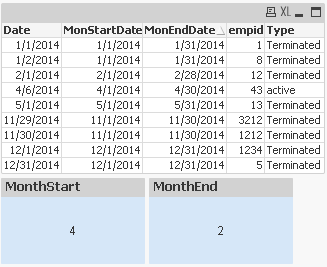
This is your complete script you have the date format issue i thing for this use Trim to remove spaces from field and get the script as
tmp:
LOAD
Date(Date,'M/D/YYYY') AS Date,
MonthStart( Trim(Date)) as MonStartDate,
MonthEnd( trim( Date)) as MonEndDate,
empid,
Type
FROM
mockup.xlsx
(ooxml, embedded labels, table is Sheet1);
NoConcatenate
N:
LOAD
Date(Trim(Date)) as Date,
Date( Trim( MonStartDate )) as MonStartDate,
Date(Trim( MonEndDate )) as MonEndDate,
empid,
Type
Resident tmp;
DROP Table tmp;
And then write expressions:-
Monthstart
=Count( if( Date = MonStartDate , empid ))
MonthEnd
=Count( if( (Date) = Trim(MonEndDate) , empid ))
Regards
Anand
jyothish8807
- Mark as New
- Bookmark
- Subscribe
- Mute
- Subscribe to RSS Feed
- Permalink
- Report Inappropriate Content
Right, my bad Joe.
KC
- Mark as New
- Bookmark
- Subscribe
- Mute
- Subscribe to RSS Feed
- Permalink
- Report Inappropriate Content
no worries, just checking it wasn't my brain being funny this early in the morning 
- « Previous Replies
-
- 1
- 2
- Next Replies »