Unlock a world of possibilities! Login now and discover the exclusive benefits awaiting you.

- Qlik Community
- :
- All Forums
- :
- QlikView
- :
- Monthwise Values Instead Of YTD
- Subscribe to RSS Feed
- Mark Topic as New
- Mark Topic as Read
- Float this Topic for Current User
- Bookmark
- Subscribe
- Mute
- Printer Friendly Page

 ashish_2511
- Mark as New
- Bookmark
- Subscribe
- Mute
- Subscribe to RSS Feed
- Permalink
- Report Inappropriate Content
Monthwise Values Instead Of YTD
Hi there
I've the following issue. Appreciate any quick help -
I've a pivot table like this -

Please Note-
The actual table in qlikview is actually a transpose of it where month-year is a dimension(The above mentioned table is not even the source, It's just a sample provided by client).
The data that comes from source are ytd values. Hence Feb-15 actuals would be Feb-15 data - Jan-15 data = 12883
Can anybody suggest how to achieve this at an expression level.
The Current expression that i'm using to calculate 'Connection Sales to Public' is - Only({<[Account Description] = {'412104*'}>}[YTD-Budget]). Need a modified expression instead though.
Regards
-Sneh
- « Previous Replies
-
- 1
- 2
- Next Replies »

 sunny_talwar
- Mark as New
- Bookmark
- Subscribe
- Mute
- Subscribe to RSS Feed
- Permalink
- Report Inappropriate Content
Your script is very complicated for me to propose anything, but as Digvijay mentioned, you can use Peek() or Previous() ? to accomplish this in the script. If you can provide sample data for one of the expressions, I might be able to show you how it can be done.
Also, you can further simplify your above expression to this
Only({<[Account Description] = {'412104*'}>}[YTD-Budget]) - Alt(Above(Only({<[Account Description] = {'412104*'}>}[YTD-Budget])), 0)
Instead of using this
If(RowNo()=1,Only({<[Account Description] = {'412104*'}>}[YTD-Budget]),Only({<[Account Description] = {'412104*'}>}[YTD-Budget]) - Above(Only({<[Account Description] = {'412104*'}>}[YTD-Budget])))
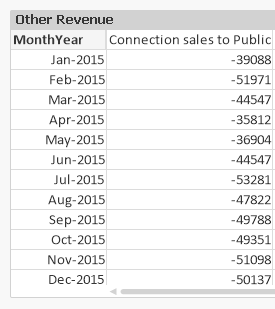
Applied the new expression to just one expression.
ashish_2511
- Mark as New
- Bookmark
- Subscribe
- Mute
- Subscribe to RSS Feed
- Permalink
- Report Inappropriate Content
Thank you so much Sunny.
Regards
-Sneh

- « Previous Replies
-
- 1
- 2
- Next Replies »