Unlock a world of possibilities! Login now and discover the exclusive benefits awaiting you.

- Qlik Community
- :
- All Forums
- :
- QlikView
- :
- Multiple Expressions
Options
- Subscribe to RSS Feed
- Mark Topic as New
- Mark Topic as Read
- Float this Topic for Current User
- Bookmark
- Subscribe
- Mute
- Printer Friendly Page
Turn on suggestions
Auto-suggest helps you quickly narrow down your search results by suggesting possible matches as you type.
Showing results for

Anonymous
Not applicable
2015-04-30
12:02 PM
- Mark as New
- Bookmark
- Subscribe
- Mute
- Subscribe to RSS Feed
- Permalink
- Report Inappropriate Content
Multiple Expressions
Hi,
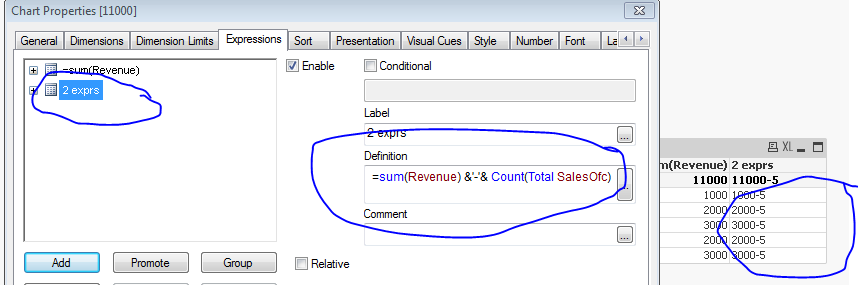
Can we have 2 independent expressions in same edit expression window....
if yes any examples.....
Please let me know
Thanks....
1,500 Views
7 Replies
Anonymous
Not applicable
2015-04-30
12:04 PM
Author
- Mark as New
- Bookmark
- Subscribe
- Mute
- Subscribe to RSS Feed
- Permalink
- Report Inappropriate Content
Can you explain what you're trying to achieve?
1,420 Views

 buzzy996
Master II
2015-04-30
12:09 PM
- Mark as New
- Bookmark
- Subscribe
- Mute
- Subscribe to RSS Feed
- Permalink
- Report Inappropriate Content
see tis,
1,420 Views
Anonymous
Not applicable
2015-04-30
12:10 PM
Author
- Mark as New
- Bookmark
- Subscribe
- Mute
- Subscribe to RSS Feed
- Permalink
- Report Inappropriate Content
I am actually trying to put expression into calculation condition in general tab in chart properties.
I display data in pivot table based on if condition.
Here, i need to check if to any expression is <> 0 then error message should display
1,420 Views
Anonymous
Not applicable
2015-04-30
12:22 PM
Author
- Mark as New
- Bookmark
- Subscribe
- Mute
- Subscribe to RSS Feed
- Permalink
- Report Inappropriate Content
It is one expression 
1,420 Views
Anonymous
Not applicable
2015-04-30
12:24 PM
Author
- Mark as New
- Bookmark
- Subscribe
- Mute
- Subscribe to RSS Feed
- Permalink
- Report Inappropriate Content
It is one expression
Expression1<>0 and Expression2<>0
1,420 Views
buzzy996
Master II
2015-04-30
12:31 PM
- Mark as New
- Bookmark
- Subscribe
- Mute
- Subscribe to RSS Feed
- Permalink
- Report Inappropriate Content
ya ,but both are independent expressions..is't not right?
1,420 Views
Anonymous
Not applicable
2015-04-30
12:47 PM
Author
- Mark as New
- Bookmark
- Subscribe
- Mute
- Subscribe to RSS Feed
- Permalink
- Report Inappropriate Content
Nope 
They are part of one expression in this case 