Unlock a world of possibilities! Login now and discover the exclusive benefits awaiting you.

- Qlik Community
- :
- All Forums
- :
- QlikView
- :
- Multiple enteries(with spaces) in INPUT box
- Subscribe to RSS Feed
- Mark Topic as New
- Mark Topic as Read
- Float this Topic for Current User
- Bookmark
- Subscribe
- Mute
- Printer Friendly Page

 varunjain
- Mark as New
- Bookmark
- Subscribe
- Mute
- Subscribe to RSS Feed
- Permalink
- Report Inappropriate Content
Multiple enteries(with spaces) in INPUT box
Hi,
I have a scenario where in there is an input box for CUSTOMER NAME(eg Sam johnson, Chris Mathhews).
The sam needed to be done for the account numbe which I was able to attain as thr is no space in between an ACCOUNT numbr.
Please assist how to attain this where in a user can put in multiple names (with space in between first name and the last name) and accoding to that CUSTOMERNAME attribute gets filter out.
Thanks 

 tresB
tresB
- Mark as New
- Bookmark
- Subscribe
- Mute
- Subscribe to RSS Feed
- Permalink
- Report Inappropriate Content
I guess you should better use search object.
varunjain
- Mark as New
- Bookmark
- Subscribe
- Mute
- Subscribe to RSS Feed
- Permalink
- Report Inappropriate Content
Hi tres,
Thanks for your reply. But that wont be able to serve the purpose of selecting(input(ing)) multiple entries.
tresB
- Mark as New
- Bookmark
- Subscribe
- Mute
- Subscribe to RSS Feed
- Permalink
- Report Inappropriate Content
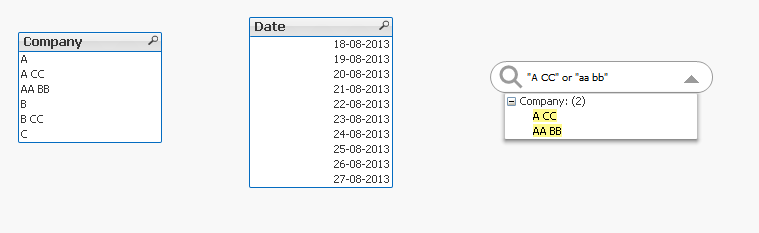
you can always do that like:
first string or second string ----- in the search box. here OR plays the role for multiple selections
tresB
- Mark as New
- Bookmark
- Subscribe
- Mute
- Subscribe to RSS Feed
- Permalink
- Report Inappropriate Content
to be specific you have to write the strings like:
"String One" Or "String two" .....to handle the spaces "" would be required
varunjain
- Mark as New
- Bookmark
- Subscribe
- Mute
- Subscribe to RSS Feed
- Permalink
- Report Inappropriate Content
Can you please share an example if possible?
tresB
- Mark as New
- Bookmark
- Subscribe
- Mute
- Subscribe to RSS Feed
- Permalink
- Report Inappropriate Content
PFA and screenshot to understand how i searched.