Unlock a world of possibilities! Login now and discover the exclusive benefits awaiting you.

- Qlik Community
- :
- All Forums
- :
- QlikView
- :
- Need Help
- Subscribe to RSS Feed
- Mark Topic as New
- Mark Topic as Read
- Float this Topic for Current User
- Bookmark
- Subscribe
- Mute
- Printer Friendly Page

 Nagaraju_KCS
- Mark as New
- Bookmark
- Subscribe
- Mute
- Subscribe to RSS Feed
- Permalink
- Report Inappropriate Content
Need Help
HI Community,
I am confusing with Mod() function...
Example:
Mod(15,3) is 0 because 15/3 is 5 (5*3=15) with reminder 0 --------------> this is OK
But,
mod( 7.5,2 ) is 1.2 because 7.5/2 is 3 (3*2=6) with reminder 1.5 ------> but in Qlikview it returns NULL value
and mod( -4,3 )is -1 because -4/3 is -1 ------> But in Qlikview it returns 2
any Logic here????
Please anyone give explanation...
- Tags:
- new_to_qlikview

- Mark as New
- Bookmark
- Subscribe
- Mute
- Subscribe to RSS Feed
- Permalink
- Report Inappropriate Content
It is explained in the QV Desktop Help, pasted in below.
Mathematical modula function. Both parameters must have integer values. x2 must be greater than 0. The result is the non-negative remainder of an integer division.
Examples:
mod( 7,2 ) returns 1
mod( 7.5,2 ) returns NULL
mod( 9,3 ) returns 0
mod( -4,3 ) returns 2
mod( 4,-3 ) returns NULL
mod( -4,-3 ) returns NULL
Nagaraju_KCS
- Mark as New
- Bookmark
- Subscribe
- Mute
- Subscribe to RSS Feed
- Permalink
- Report Inappropriate Content
Hi Bill,
I Understood this one..
What is the Logic for these two??
Suppose Mod(x1,x2) here X2 greater than 0.
mod( 7.5,2 ) returns NULL
mod( -4,3 ) returns 2

 MarcoWedel
- Mark as New
- Bookmark
- Subscribe
- Mute
- Subscribe to RSS Feed
- Permalink
- Report Inappropriate Content
Use fmod() for decimal numbers
Regards
Marco
MarcoWedel
- Mark as New
- Bookmark
- Subscribe
- Mute
- Subscribe to RSS Feed
- Permalink
- Report Inappropriate Content
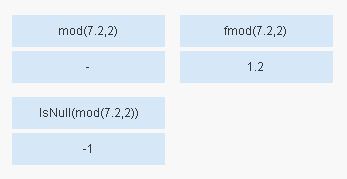
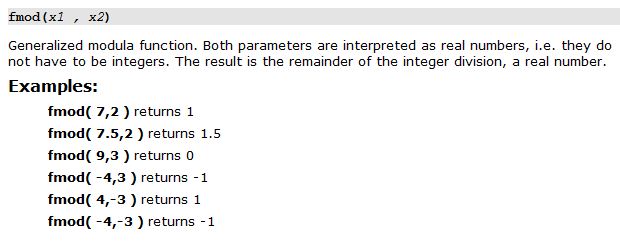
hope this helps
regards
Marco
Nagaraju_KCS
- Mark as New
- Bookmark
- Subscribe
- Mute
- Subscribe to RSS Feed
- Permalink
- Report Inappropriate Content
Hi Wedel,
May be it works like this...
Formula: (Excel Formula)
Mod(A, B) =A - B * Int (A / B)
Mod(-4,3) = -4 -3 * (-2) =2
Suppose INT(A/B) means---->Rounds down
like INT(8.9) = Rounds 8.9 down= returns 8
INT(-8.9)= Rounds -8.9 down = returns -9