Unlock a world of possibilities! Login now and discover the exclusive benefits awaiting you.

- Qlik Community
- :
- All Forums
- :
- QlikView
- :
- Need help on synthetic key
- Subscribe to RSS Feed
- Mark Topic as New
- Mark Topic as Read
- Float this Topic for Current User
- Bookmark
- Subscribe
- Mute
- Printer Friendly Page

 agni_gold
- Mark as New
- Bookmark
- Subscribe
- Mute
- Subscribe to RSS Feed
- Permalink
- Report Inappropriate Content
Need help on synthetic key
I have 2 Tables , having large number of columns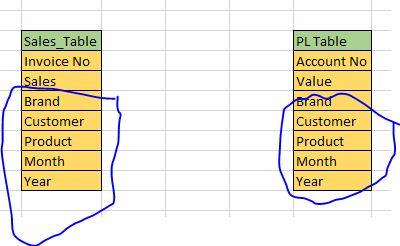 , i am attaching the sample tables here. In both table you can see there are some columns are common , but these tables are not liked together because there is no relation . but i need to put in same data model .
But common columns creates the synthetic key . I want to sort the both amounts on the basis of brand , product , customer and year , month .
We can not create the composite key also , because i need to give filter listbox in my dashboard . please help how to link without synthetic key .
- Tags:
- synthetic key
- « Previous Replies
-
- 1
- 2
- Next Replies »

 swuehl
- Mark as New
- Bookmark
- Subscribe
- Mute
- Subscribe to RSS Feed
- Permalink
- Report Inappropriate Content
Have you considered concatenating your two tables?
agni_gold
- Mark as New
- Bookmark
- Subscribe
- Mute
- Subscribe to RSS Feed
- Permalink
- Report Inappropriate Content
no these are individual tables , we can not concatenate
swuehl
- Mark as New
- Bookmark
- Subscribe
- Mute
- Subscribe to RSS Feed
- Permalink
- Report Inappropriate Content
Not sure if I understand, there is no relation between the table, you want them isolated?
Maybe consider using
QUALIFY *;
Table1:
LOAD * FROM Table1;
Table2:
LOAD * FROM Table2;
UNQUALIFY *;

 MarcoWedel
- Mark as New
- Bookmark
- Subscribe
- Mute
- Subscribe to RSS Feed
- Permalink
- Report Inappropriate Content
please post some sample data and your expected result.
thanks
regards
Marco

 arsal_90
- Mark as New
- Bookmark
- Subscribe
- Mute
- Subscribe to RSS Feed
- Permalink
- Report Inappropriate Content
Create Link Table for Common dimensions. Hopefully it will resolved your problem.
agni_gold
- Mark as New
- Bookmark
- Subscribe
- Mute
- Subscribe to RSS Feed
- Permalink
- Report Inappropriate Content
yes i have tried this also , but the problem is that when i want to provide the filter for Brand, Product and Customer , both the data will not be sort.
agni_gold
- Mark as New
- Bookmark
- Subscribe
- Mute
- Subscribe to RSS Feed
- Permalink
- Report Inappropriate Content
for link table i have to add all the columns because there is no primary key in both the tables.
swuehl
- Mark as New
- Bookmark
- Subscribe
- Mute
- Subscribe to RSS Feed
- Permalink
- Report Inappropriate Content
Maybe you can use a kind of trigger to copy selections in the field of interest around the two tables, to allow the user to select in one list box and filter both tables.
agni_gold
- Mark as New
- Bookmark
- Subscribe
- Mute
- Subscribe to RSS Feed
- Permalink
- Report Inappropriate Content
Can you please explain little bit more about this ?
It seems to good for my question..

- « Previous Replies
-
- 1
- 2
- Next Replies »