Unlock a world of possibilities! Login now and discover the exclusive benefits awaiting you.

- Qlik Community
- :
- All Forums
- :
- QlikView
- :
- Negect current seletion in a complicated set analy...
- Subscribe to RSS Feed
- Mark Topic as New
- Mark Topic as Read
- Float this Topic for Current User
- Bookmark
- Subscribe
- Mute
- Printer Friendly Page

- Mark as New
- Bookmark
- Subscribe
- Mute
- Subscribe to RSS Feed
- Permalink
- Report Inappropriate Content
Negect current seletion in a complicated set analysis expression
Hi, I have the following piece of data and what i would like to achieve is illustrated also.
| Customer_no | Bank No | Transaction Date | Transaction Type | Amount |
| C0001 | B0001 | 1/1/2015 | A | 1000 |
| C0001 | B0001 | 1/1/2015 | B | 2000 |
| C0001 | B0001 | 1/1/2015 | C | 2000 |
| C0002 | B0002 | 1/1/2015 | A | 3000 |
| C0002 | B0002 | 1/1/2015 | B | 3000 |
| C0002 | B0002 | 1/2/2015 | A | 4000 |
| C0002 | B0003 | 1/3/2015 | A | 4000 |
| C0002 | B0004 | 1/3/2015 | B | 4000 |
| C0003 | B0005 | 1/1/2015 | A | 5000 |
| C0003 | B0005 | 1/1/2015 | B | 5000 |
| C0004 | B0006 | 1/1/2015 | A | 6000 |
| C0004 | B0006 | 1/1/2015 | A | 6000 |
| C0004 | B0006 | 1/1/2015 | B | 8000 |
| C0004 | B0007 | 1/1/2015 | A | 8000 |
| C0004 | B0007 | 1/1/2015 | B | 1000 |
| C0004 | B0008 | 1/1/2015 | A | 1000 |
| C0004 | B0008 | 1/1/2015 | B | 8000 |
| C0004 | B0008 | 1/1/2015 | A | 8000 |
| C0004 | B0009 | 1/1/2015 | A | 1000 |
| C0004 | B0009 | 1/1/2015 | B | 8000 |
| C0004 | B0009 | 1/1/2015 | C | 8000 |
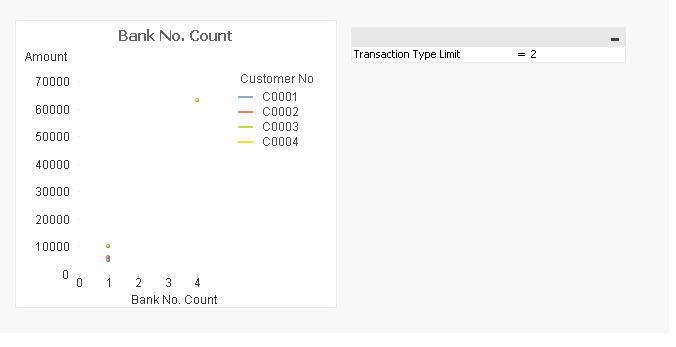
Basically, user can input a number in the input box to indicate the maximum number of transaction a bank account number could have per day, and the scattered plot will display the customer number with the bank account that hit the criteria.
My problem now is that I want to keep the graph the same when each dot is selected. Usually this can be achieved by disregarding the dimension in set analysis. In this case this will be {<Customer_no=>}.
However, it doesn't work this time, This is expression bank_no_transation_date={"=aggr(count({<Customer_no=>}distinct [Transaction Type]),bank_no_transation_date)>=$(vLimit)"}
I have attached the qvw file. ould you please advise?

 tresB
tresB
- Mark as New
- Bookmark
- Subscribe
- Mute
- Subscribe to RSS Feed
- Permalink
- Report Inappropriate Content
Check attached qvw. Remove the Aggr() from your set expression section.
- Mark as New
- Bookmark
- Subscribe
- Mute
- Subscribe to RSS Feed
- Permalink
- Report Inappropriate Content
Thanks. it works. I would also like to know in case aggr unction must be used, is there any alternative way of doing it apart from removing the aggr function?
tresB
- Mark as New
- Bookmark
- Subscribe
- Mute
- Subscribe to RSS Feed
- Permalink
- Report Inappropriate Content
Yes, you can use only() along with aggr() like:
bank_no_transation_date={"=Only({<Customer_no=>} aggr(count({<Customer_no=>}distinct [Transaction Type]),bank_no_transation_date))>=$(vLimit)"}
But, here too, I don't see the obviousness of using aggr().
I am really yet to find a case when aggr() usage is really needed in Set Analysis.