Unlock a world of possibilities! Login now and discover the exclusive benefits awaiting you.

- Qlik Community
- :
- All Forums
- :
- QlikView
- :
- No header in simple table
- Subscribe to RSS Feed
- Mark Topic as New
- Mark Topic as Read
- Float this Topic for Current User
- Bookmark
- Subscribe
- Mute
- Printer Friendly Page

- Mark as New
- Bookmark
- Subscribe
- Mute
- Subscribe to RSS Feed
- Permalink
- Report Inappropriate Content
No header in simple table
Hi,
I am trying to reproduce the KPI tab of the Executive Dashboard demo application (see below).
There are 2 simple tables with no header. On my own application, I can't get rid of this header.
Do you have any idea ?
Any help would be much appreciated.
Thanks,
Bertrand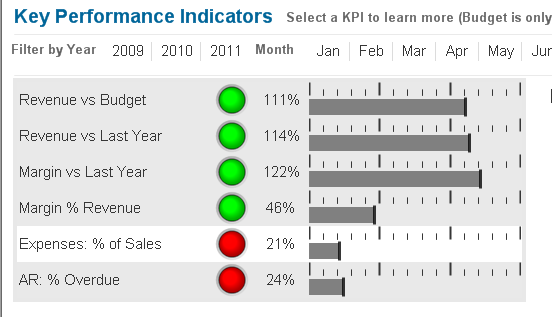
Accepted Solutions

 Aurelien_Martin
- Mark as New
- Bookmark
- Subscribe
- Mute
- Subscribe to RSS Feed
- Permalink
- Report Inappropriate Content
Hi,
On Chart properties => Presentation => check Suppress Header Row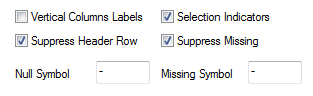
Regards,
Aurélien
- Mark as New
- Bookmark
- Subscribe
- Mute
- Subscribe to RSS Feed
- Permalink
- Report Inappropriate Content
"Suppres Header row" on Presentation tab and Un check "Show Caption" on Caption tab.
Karthik

 israrkhan
- Mark as New
- Bookmark
- Subscribe
- Mute
- Subscribe to RSS Feed
- Permalink
- Report Inappropriate Content
hi,
on properties>> caption tab, uncheck "show caption"
it will hide header...
is this you are looking....
Aurelien_Martin- Mark as New
- Bookmark
- Subscribe
- Mute
- Subscribe to RSS Feed
- Permalink
- Report Inappropriate Content
Hi,
On Chart properties => Presentation => check Suppress Header Row
Regards,
Aurélien
- Mark as New
- Bookmark
- Subscribe
- Mute
- Subscribe to RSS Feed
- Permalink
- Report Inappropriate Content
Thanks Aurélien. That little check box is a bit tricky to find. Now I know.
Thanks all.