Unlock a world of possibilities! Login now and discover the exclusive benefits awaiting you.

- Qlik Community
- :
- All Forums
- :
- QlikView
- :
- Not all the years
- Subscribe to RSS Feed
- Mark Topic as New
- Mark Topic as Read
- Float this Topic for Current User
- Bookmark
- Subscribe
- Mute
- Printer Friendly Page

- Mark as New
- Bookmark
- Subscribe
- Mute
- Subscribe to RSS Feed
- Permalink
- Report Inappropriate Content
Not all the years
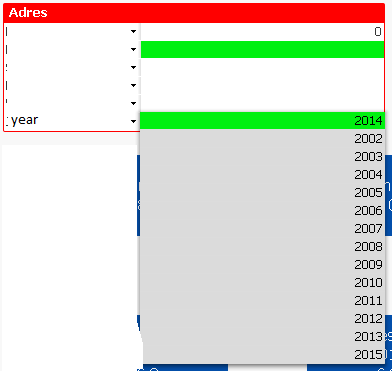
You see the years 2002 - 2015, but I only want to see the years 2012 - 2015 how can I fix that?
- Tags:
- new_to_qlikview

 rubenmarin
- Mark as New
- Bookmark
- Subscribe
- Mute
- Subscribe to RSS Feed
- Permalink
- Report Inappropriate Content
Hi, you can use an expression in multi-select box, ie:
=If(Year>2012, Year)
or
=If(Year>=Year(Today())-3, Year)

 marcus_malinow
- Mark as New
- Bookmark
- Subscribe
- Mute
- Subscribe to RSS Feed
- Permalink
- Report Inappropriate Content
You'll have to limit the data you're loading.
In your load script you can use criteria such as 'where year(YourDateField) >= 2012'

 buzzy996
- Mark as New
- Bookmark
- Subscribe
- Mute
- Subscribe to RSS Feed
- Permalink
- Report Inappropriate Content
try this on ur year field on multi box properties
=If(ur year field>='2012',ur year field,null())
 prieper
- Mark as New
- Bookmark
- Subscribe
- Mute
- Subscribe to RSS Feed
- Permalink
- Report Inappropriate Content
Why? When there are data behind, it might be shown. If no data behind, might be limited in the script.
Anyhow: you may use an expression in the listbox:
IF(YearField >= 2012, YearField)
HTH Peter
marcus_malinow
- Mark as New
- Bookmark
- Subscribe
- Mute
- Subscribe to RSS Feed
- Permalink
- Report Inappropriate Content
Correction - as per Ruben's suggestion you can use a calculated dimension, so you don't have to limit the data you're loading.
However, if you're not going to allow it to be selected, why bother loading it?
- Mark as New
- Bookmark
- Subscribe
- Mute
- Subscribe to RSS Feed
- Permalink
- Report Inappropriate Content
Here you go