Unlock a world of possibilities! Login now and discover the exclusive benefits awaiting you.

- Qlik Community
- :
- All Forums
- :
- QlikView
- :
- Number Format
- Subscribe to RSS Feed
- Mark Topic as New
- Mark Topic as Read
- Float this Topic for Current User
- Bookmark
- Subscribe
- Mute
- Printer Friendly Page

- Mark as New
- Bookmark
- Subscribe
- Mute
- Subscribe to RSS Feed
- Permalink
- Report Inappropriate Content
Number Format
I've the following number: 10,01234
And I want to represent them into this format: 10.012,34
I already try all the formats in number tab but nothing returns what I want.
What comes closest to what I want is :##.##,###
Anyone have any idea?
Thanks 
Accepted Solutions

 t_chetirbok
- Mark as New
- Bookmark
- Subscribe
- Mute
- Subscribe to RSS Feed
- Permalink
- Report Inappropriate Content
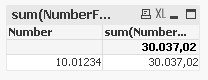
Hi, cause chart display sum, you should use:

so your result will be like this:

 Peter_Cammaert
- Mark as New
- Bookmark
- Subscribe
- Mute
- Subscribe to RSS Feed
- Permalink
- Report Inappropriate Content
Like this?
=num(YourField * 1000.0, '#.##0,00', ',', '.')
- Mark as New
- Bookmark
- Subscribe
- Mute
- Subscribe to RSS Feed
- Permalink
- Report Inappropriate Content
Thanks Peter, but it doesn't returns the format that I want 
Peter_Cammaert
- Mark as New
- Bookmark
- Subscribe
- Mute
- Subscribe to RSS Feed
- Permalink
- Report Inappropriate Content
Where is your "number" stored? Is it a text string?
It does work for me though. This script
RawData:
LOAD 10.01234 AS Number AUTOGENERATE 1; // Raw Binary number, default format
Data:
NOCONCATENATE
LOAD *, Num(NumberFormat1 * 1000.0, '#.##0,00', ',', '.') AS NumberFormat2;
LOAD *, Num(Number, '#0,00000', ',') AS NumberFormat1
RESIDENT RawData;
DROP Table RawData;
produces this in a table box (no number tweaking)

See attachment.
Best,
Peter
- Mark as New
- Bookmark
- Subscribe
- Mute
- Subscribe to RSS Feed
- Permalink
- Report Inappropriate Content
If I multiplicate by 1000 I get the number correct in my chart, however the value of my pop up it isn't correct...
- Mark as New
- Bookmark
- Subscribe
- Mute
- Subscribe to RSS Feed
- Permalink
- Report Inappropriate Content
Is a bar chart, its a result of a calculation
Peter_Cammaert
- Mark as New
- Bookmark
- Subscribe
- Mute
- Subscribe to RSS Feed
- Permalink
- Report Inappropriate Content
Please post an example document with this phenomenon, or we will have to guess what exactly you are doing and that may take a while. Thanks
Peter
 jagan
jagan
- Mark as New
- Bookmark
- Subscribe
- Mute
- Subscribe to RSS Feed
- Permalink
- Report Inappropriate Content
Hi,
Try like this
=Num(Replace(FieldName, ',', '')/100, '#.##0,00', ',', '.')
Regards,
jagan.
t_chetirbok
- Mark as New
- Bookmark
- Subscribe
- Mute
- Subscribe to RSS Feed
- Permalink
- Report Inappropriate Content
Hi, cause chart display sum, you should use:
so your result will be like this: