Unlock a world of possibilities! Login now and discover the exclusive benefits awaiting you.

- Qlik Community
- :
- All Forums
- :
- QlikView
- :
- Only one value in a dimension
- Subscribe to RSS Feed
- Mark Topic as New
- Mark Topic as Read
- Float this Topic for Current User
- Bookmark
- Subscribe
- Mute
- Printer Friendly Page

 iliyansomlev
- Mark as New
- Bookmark
- Subscribe
- Mute
- Subscribe to RSS Feed
- Permalink
- Report Inappropriate Content
Only one value in a dimension
Dear Community,
I have a simple question and I don't know if this can be done in qlikview, so please help me find out.
Please refer to the attached app. I have to show only one line for each CodeGroup in the straight table that has sum(Value) for an expression. But what is required also is that I have a column for the detailed Codes with drop-down menu. If I just add Codes as a dimension the lines will be multiple with detailed sum for each code, which is not what is wanted. There should be one line only with total sum(Value) for each CodeGroup.
I tried with aggr function but the dropdown menu doesn't show all possible Code values , it shows only the result of the aggr function.
Do you know if such match of grouped-detailed information is possible and what is the best way to visualise it?
Thanks.

- Mark as New
- Bookmark
- Subscribe
- Mute
- Subscribe to RSS Feed
- Permalink
- Report Inappropriate Content
Hi,
You could not use the pivot table?

Rebeca

 rustyfishbones
- Mark as New
- Bookmark
- Subscribe
- Mute
- Subscribe to RSS Feed
- Permalink
- Report Inappropriate Content
See the attached file
I just changed the Straight Table to a Pivot Table
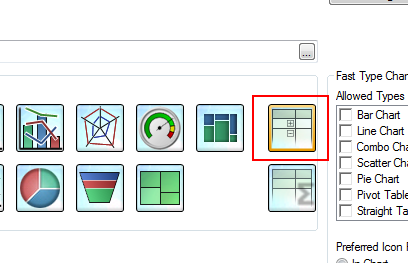
Is that what you need
Regards
Alan
 Gysbert_Wassena
- Mark as New
- Bookmark
- Subscribe
- Mute
- Subscribe to RSS Feed
- Permalink
- Report Inappropriate Content
You can't show all the codes in the dropdown but only aggregated values in the table. Add a listbox for the codes and make your selections in that listbox.
You can try faking the dropdown control with a multi box object put on top of the header of the calculated code dimension. That would look something like this:
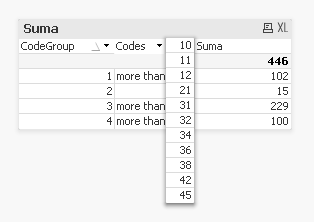
not very pretty imho and likely to get messed up in the ajax client.
talk is cheap, supply exceeds demand