Unlock a world of possibilities! Login now and discover the exclusive benefits awaiting you.

- Qlik Community
- :
- All Forums
- :
- QlikView
- :
- Only or Total
- Subscribe to RSS Feed
- Mark Topic as New
- Mark Topic as Read
- Float this Topic for Current User
- Bookmark
- Subscribe
- Mute
- Printer Friendly Page

 cbaqir
- Mark as New
- Bookmark
- Subscribe
- Mute
- Subscribe to RSS Feed
- Permalink
- Report Inappropriate Content
Only or Total

Select AU_NUM 848030.
In the Year End Forecast chart, I want the FY Budget to show 7325705 but it's summing the three months. What modifier should I use and how?
Accepted Solutions

 Frank_Hartmann
- Mark as New
- Bookmark
- Subscribe
- Mute
- Subscribe to RSS Feed
- Permalink
- Report Inappropriate Content
try this for FY Budget expression:
aggr(sum(FY_BUDGET_AMT),TRX_DATE,AU_NUM)
hope this helps
Frank_Hartmann
- Mark as New
- Bookmark
- Subscribe
- Mute
- Subscribe to RSS Feed
- Permalink
- Report Inappropriate Content
try this for FY Budget expression:
aggr(sum(FY_BUDGET_AMT),TRX_DATE,AU_NUM)
hope this helps
cbaqir
- Mark as New
- Bookmark
- Subscribe
- Mute
- Subscribe to RSS Feed
- Permalink
- Report Inappropriate Content
Thanks, Frank. Second question... now I want to only show the result for the max(TRX_DATE).
How can I use max(TRX_DATE) with the expression of =sum({$}FY_FCST_AMT)+sum({$}YTD_GL_AMT) ? !

Frank_Hartmann
- Mark as New
- Bookmark
- Subscribe
- Mute
- Subscribe to RSS Feed
- Permalink
- Report Inappropriate Content
perhaps this:
max(aggr(sum({$}FY_FCST_AMT)+sum({$}YTD_GL_AMT) ,TRX_DATE,AU_NUM))
hope this helps
cbaqir
- Mark as New
- Bookmark
- Subscribe
- Mute
- Subscribe to RSS Feed
- Permalink
- Report Inappropriate Content
Perfect, thanks!

 sunny_talwar
- Mark as New
- Bookmark
- Subscribe
- Mute
- Subscribe to RSS Feed
- Permalink
- Report Inappropriate Content
Do you need the value for the max date or do you need the max value? If you need the value associated with max date, then try this
FirstSortedValue(aggr(sum({$}FY_FCST_AMT)+sum({$}YTD_GL_AMT) ,TRX_DATE,AU_NUM), -aggr(TRX_DATE, TRX_DATE,AU_NUM))
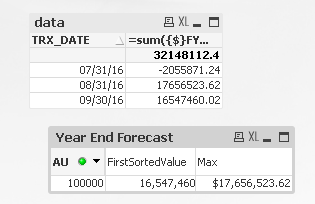
When 100000 is selected, max is max from the three dates and FirstSortedValue is value associated with max date
