Unlock a world of possibilities! Login now and discover the exclusive benefits awaiting you.

- Qlik Community
- :
- All Forums
- :
- QlikView
- :
- Oracle timestamp in qlikview
Options
- Subscribe to RSS Feed
- Mark Topic as New
- Mark Topic as Read
- Float this Topic for Current User
- Bookmark
- Subscribe
- Mute
- Printer Friendly Page
Turn on suggestions
Auto-suggest helps you quickly narrow down your search results by suggesting possible matches as you type.
Showing results for

 manideep78
Partner - Specialist
2019-12-24
12:09 PM
- Mark as New
- Bookmark
- Subscribe
- Mute
- Subscribe to RSS Feed
- Permalink
- Report Inappropriate Content
Oracle timestamp in qlikview
Dear Community,
I have timestamp 09-DEC-19 02.03.28.604711000 PM coming from Oracle into Qlikview and it is a string.
I could not covert that into qlikview timestamp format using Timestamp#.
Any suggestions welcome.
887 Views
1 Reply

 Taoufiq_Zarra
MVP
2019-12-24
03:55 PM
- Mark as New
- Bookmark
- Subscribe
- Mute
- Subscribe to RSS Feed
- Permalink
- Report Inappropriate Content
if that doesn't work, you can always use the hard methods 😁
=TimeStamp(Time#(left(Right(('09-DEC-19 02.03.28.604711000 PM'),21),8)&' '&Right(Right(('09-DEC-19 02.03.28.604711000 PM'),21),2),'hh.mm.ss TT')+ Date#(left(('09-DEC-19 02.03.28.604711000 PM'),9),'DD-MMM-YY'), 'DD/MM/YYYY hh:mm:ss')you can get results like :
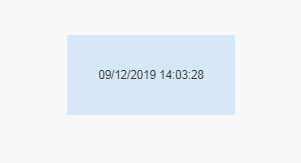
which you can use as a TimeStamp, i.e. you can extract the hour, minutes, ...
Regards,
Taoufiq ZARRA
"Please LIKE posts and "Accept as Solution" if the provided solution is helpful "
(you can mark up to 3 "solutions") 😉
Taoufiq ZARRA
"Please LIKE posts and "Accept as Solution" if the provided solution is helpful "
(you can mark up to 3 "solutions") 😉
856 Views
