Unlock a world of possibilities! Login now and discover the exclusive benefits awaiting you.

- Qlik Community
- :
- All Forums
- :
- QlikView
- :
- Outer Join Doubt?
- Subscribe to RSS Feed
- Mark Topic as New
- Mark Topic as Read
- Float this Topic for Current User
- Bookmark
- Subscribe
- Mute
- Printer Friendly Page

- Mark as New
- Bookmark
- Subscribe
- Mute
- Subscribe to RSS Feed
- Permalink
- Report Inappropriate Content
Outer Join Doubt?
Dear All
I have this Script:
TABLE_1:
LOAD *, New_Date&'-'&New_Number AS LINK_KEY INLINE [
ID, Type_ID, New_Date, New_Number
11, AA, 01-07-2016, ABC
];
OUTER JOIN(TABLE_1)
LOAD *, New_Date&'-'&New_Number AS LINK_KEY INLINE [
ID, New_Date, New_Number
12, 01-07-2016, ABC
13, 01-07-2016, ABC
];
Qlikview is giving me this Result:
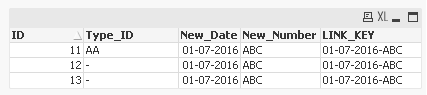
Required Result is this:

If the Key is same than why it is giving me Nulls.
I have to bring Type_ID from Table1 (First Table).
Someone Please help me.
Regards
Eric

 boorgura
- Mark as New
- Bookmark
- Subscribe
- Mute
- Subscribe to RSS Feed
- Permalink
- Report Inappropriate Content
ID will be considered a KEY as well. you can specifically specify on what fields to join in Qlik - unless you rename the fields. (which will result in multiple columns)
If you need the output you mentioned - use something like below:
TABLE_1:
LOAD *, New_Date&'-'&New_Number AS LINK_KEY INLINE [
ID, Type_ID, New_Date, New_Number
11, AA, 01-07-2016, ABC
];
TABLE_2:
LOAD *, New_Date&'-'&New_Number AS LINK_KEY INLINE [
ID, New_Date, New_Number
12, 01-07-2016, ABC
13, 01-07-2016, ABC
];
Outer Join(TABLE_2)
LOAD ID, New_Date, New_Number, New_Date&'-'&New_Number AS LINK_KEY
Resident TABLE_1;
Join(TABLE_2)
LOAD Type_ID
Resident TABLE_1;
DROP Table TABLE_1;
- Mark as New
- Bookmark
- Subscribe
- Mute
- Subscribe to RSS Feed
- Permalink
- Report Inappropriate Content
Thanks for the Reply.
Is there something we can do within the code rather than using Resident Load againand again.

 rubenmarin
- Mark as New
- Bookmark
- Subscribe
- Mute
- Subscribe to RSS Feed
- Permalink
- Report Inappropriate Content
Hi Eric, you can retrieve that field value with this something like this code:
Table1:
LOAD *, New_Date&'-'&New_Number AS LINK_KEY INLINE [
ID, Type_ID, New_Date, New_Number
11, AA, 01-07-2016, ABC
];
Table2:
LOAD *, New_Date&'-'&New_Number AS LINK_KEY INLINE [
ID, New_Date, New_Number
12, 01-07-2016, ABC
13, 01-07-2016, ABC
];
Left Join (Table2) LOAD LINK_KEY, Type_ID Resident Table1;
Concatenate (Table1) LOAD * Resident Table2;
DROP Table Table2;
-------------------------------------------------------------------------------------------
There is also an option to avoid the use of joins using lookup() but maybe the performance is worse than using Join:
Table1:
LOAD *, New_Date&'-'&New_Number AS LINK_KEY INLINE [
ID, Type_ID, New_Date, New_Number
11, AA, 01-07-2016, ABC
];
Concatenate
LOAD *, New_Date&'-'&New_Number AS LINK_KEY, Lookup('Type_ID', 'LINK_KEY', New_Date&'-'&New_Number, 'Table1') as Type_ID INLINE [
ID, New_Date, New_Number
12, 01-07-2016, ABC
13, 01-07-2016, ABC
];
 tyagishaila
- Mark as New
- Bookmark
- Subscribe
- Mute
- Subscribe to RSS Feed
- Permalink
- Report Inappropriate Content
Try it once,
TABLE_1:
LOAD *, New_Date&'-'&New_Number AS LINK_KEY INLINE [
ID, Type_ID, New_Date, New_Number
11, AA, 01-07-2016, ABC
];
MapTab:
Mapping Load
LINK_KEY,
Type_ID
Resident TABLE_1;
OUTER JOIN(TABLE_1)
LOAD *, New_Date&'-'&New_Number AS LINK_KEY,
ApplyMap('MapTab', New_Date&'-'&New_Number) As Type_ID INLINE [
ID, New_Date, New_Number
12, 01-07-2016, ABC
13, 01-07-2016, ABC
];

- Mark as New
- Bookmark
- Subscribe
- Mute
- Subscribe to RSS Feed
- Permalink
- Report Inappropriate Content
Eric,
Without column we can't get the data from Table_2.
So it should be alias name with the null values using resident.
- Anil