Unlock a world of possibilities! Login now and discover the exclusive benefits awaiting you.

- Qlik Community
- :
- All Forums
- :
- QlikView
- :
- Overlap indicators
- Subscribe to RSS Feed
- Mark Topic as New
- Mark Topic as Read
- Float this Topic for Current User
- Bookmark
- Subscribe
- Mute
- Printer Friendly Page

 fabio182
- Mark as New
- Bookmark
- Subscribe
- Mute
- Subscribe to RSS Feed
- Permalink
- Report Inappropriate Content
Overlap indicators
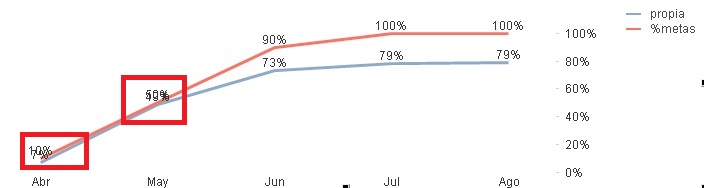
Hello everyone, It is possible to move the indicators so that they do not overlap. Thanks for your reply
- Tags:
- bar chat

 marcus_sommer
- Mark as New
- Bookmark
- Subscribe
- Mute
- Subscribe to RSS Feed
- Permalink
- Report Inappropriate Content
No, this couldn't be directly adjusted but there are various approaches to overcome this problem. Probably the most suitable solution is to disable the values from one line and to display both values on the other line. This could be reached with a dual-expression like:
dual('Expression 1: ' & num(Expression1, Format') & chr(10) & chr(10) &
'Expression 2: ' & num(Expression2, Format'),
Expression1)
More could you find in the attachment which is a german discussion converted into a pdf (it should be useful for you if you put it (partly) into google translate or something similar) and within the qvw.
- Marcus
