Unlock a world of possibilities! Login now and discover the exclusive benefits awaiting you.

- Qlik Community
- :
- All Forums
- :
- QlikView
- :
- Partial aggregations within dimensions
- Subscribe to RSS Feed
- Mark Topic as New
- Mark Topic as Read
- Float this Topic for Current User
- Bookmark
- Subscribe
- Mute
- Printer Friendly Page

- Mark as New
- Bookmark
- Subscribe
- Mute
- Subscribe to RSS Feed
- Permalink
- Report Inappropriate Content
Partial aggregations within dimensions
Hi All,
I am facing an issue in qlikview regarding aggregations within hierarchical fields. Following is the illustration of the same -
I have the following table -
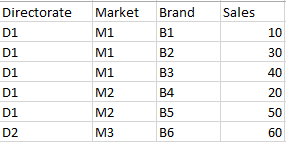
From this table i need to create a table wherein the share of each brand in its corresponding market will be calculated. Basically it should contain only Brand as a dimension and share% as an expression. For ex- the B1 should have value - sum(B1)/sum(M1) i.e 10/(10+30+40)=10/80=12.5%. Similar case for other brands that calculates the share of the brand in its market.
Currently I am using this expression- Sum(Sales)/Sum(TOTAL <Market>{<Market=p(Market),Brand={*}>}Sales)
But this expression works only when a Brand is selected by me. However when Brand is not selected, it is taking the total value.
Can anyone please help me with this problem. Thanks in advance!
Accepted Solutions

 jonathandienst
- Mark as New
- Bookmark
- Subscribe
- Mute
- Subscribe to RSS Feed
- Permalink
- Report Inappropriate Content
Hi
This will work:
Sum(Sales) / Sum(TOTAL <Market> Sales)
if Brand and Market are both dimensions. TOTAL works in the context of a dimension in the chart (or in an Aggr() expression), but you want Brand only as a dimension. You have two options
- Straight table - Market can be a dimension that is hidden. Use the expression above with Market and Brand as dimensions, and Market is hidden.
- Pivot table - you cant hide a dimension in a pivot table, so use this expression in a pivot with only Brand as a dimension:
Sum(Sales) / Sum(Aggr(Sum(TOTAL <Market> Sales), Market, Brand))
See attached
HTH
Jonathan
jonathandienst
- Mark as New
- Bookmark
- Subscribe
- Mute
- Subscribe to RSS Feed
- Permalink
- Report Inappropriate Content
Hi
This will work:
Sum(Sales) / Sum(TOTAL <Market> Sales)
if Brand and Market are both dimensions. TOTAL works in the context of a dimension in the chart (or in an Aggr() expression), but you want Brand only as a dimension. You have two options
- Straight table - Market can be a dimension that is hidden. Use the expression above with Market and Brand as dimensions, and Market is hidden.
- Pivot table - you cant hide a dimension in a pivot table, so use this expression in a pivot with only Brand as a dimension:
Sum(Sales) / Sum(Aggr(Sum(TOTAL <Market> Sales), Market, Brand))
See attached
HTH
Jonathan
- Mark as New
- Bookmark
- Subscribe
- Mute
- Subscribe to RSS Feed
- Permalink
- Report Inappropriate Content
Thanks a lot jonathan. It works perfectly! Appreciate that.