Unlock a world of possibilities! Login now and discover the exclusive benefits awaiting you.

- Qlik Community
- :
- All Forums
- :
- QlikView
- :
- Peek Value changes per ID issue
- Subscribe to RSS Feed
- Mark Topic as New
- Mark Topic as Read
- Float this Topic for Current User
- Bookmark
- Subscribe
- Mute
- Printer Friendly Page

 ngosz4074
- Mark as New
- Bookmark
- Subscribe
- Mute
- Subscribe to RSS Feed
- Permalink
- Report Inappropriate Content
Peek Value changes per ID issue
Hello,
I'm having some issues trying to get an interval of a value that I want to reset when the Customer ID changes in my table.
An example would be
ID RESULT_TIME VALUE INTERVAL
1 11/1/2013 4:42 PM 4.4 0
1 11/1/2013 4:54 PM 8.1 0:12
1 11/1/2013 8:54 PM 9.9 4:00
2 7/18/2016 7:36 AM 4.8 0
2 7/18/2016 11:45 AM 12.3 4:09
Here is my script - in Tab2 piece is where I'm trying to figure out where to peek at the value based on the time. Then reset upon the ID changing.
Tab1:
LOAD
CUST_ID,
[CUST_RESULT_TIME] as [RESULT_TIME],
[ALL_VALUE] as [VALUE]
RESIDENT ALL_CUST_RESULTS;
Tab2:
LOAD * ,
peek([RESULT_TIME]) as peek_val1,
peek ([CUST_ID]) as CUST_PEEK (this is where I'd like to change the Peek value per ID)
RESIDENT Tab1;
Drop table Tab1;
Tab3:
LOAD *,
Interval( peek_val1 - [RESULT_TIME], 'hh:mm') as IntervalDiff
RESIDENT Tab2;
Drop table Tab2;
CUST_INTERVALS:
Load *,
If ( [RESULT_TIME] > peek_val1, 'Y','N') as PreviousValueFlag,
If(IntervalDiff > '-32:01' and IntervalDiff < '0', 'Y','N') as IntervalRangeFlag
Resident Tab3;
Drop table Tab3;
What piece am I missing to complete this task?
Thanks in advance

 effinty2112
- Mark as New
- Bookmark
- Subscribe
- Mute
- Subscribe to RSS Feed
- Permalink
- Report Inappropriate Content
Hi Neal,
I've not tested this but try:
Tab1:
LOAD
CUST_ID,
[CUST_RESULT_TIME] as [RESULT_TIME],
if(CUST_ID = Peek('CUST_ID'), [CUST_RESULT_TIME] - Peek([RESULT_TIME]) ,0) as INTERVAL,
[ALL_VALUE] as [VALUE]
Cheers
Andrew
ngosz4074
- Mark as New
- Bookmark
- Subscribe
- Mute
- Subscribe to RSS Feed
- Permalink
- Report Inappropriate Content
Hi Andrew,
Thanks for replying. I get a 0 back for the results when I tried this code. So, I added an interval ( ) function wrapping the calculation and I get a '-' per CUST_ID change.
Thanks
Neal
ngosz4074
- Mark as New
- Bookmark
- Subscribe
- Mute
- Subscribe to RSS Feed
- Permalink
- Report Inappropriate Content
Here's an additional piece of the desired final result:
ID RESULT_TIME PEEK_TIME VALUE INTERVAL
1 11/1/2013 4:42 PM 0 4.4 0
1 11/1/2013 4:54 PM 11/1/2013 4:42 PM 8.1 0:12
1 11/1/2013 8:54 PM 11/2/2013 4:54 PM 9.9 4:00
2 7/18/2016 7:36 AM 0 4.8 0
2 7/18/2016 11:45 AM 7/8/2016 7:36 AM 12.3 4:09

 maxgro
- Mark as New
- Bookmark
- Subscribe
- Mute
- Subscribe to RSS Feed
- Permalink
- Report Inappropriate Content
maybe this
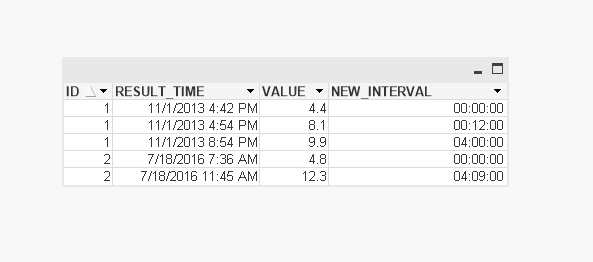
SET TimestampFormat='M/D/YYYY h:mm tt[.fff]';
SET ThousandSep=',';
SET DecimalSep='.';
😧
load rowno() as rowno, ID, RESULT_TIME, VALUE inline [
ID ; RESULT_TIME; VALUE; INTERVAL
1 ; 11/1/2013 4:42 PM; 4.4 ; 0
1 ; 11/1/2013 4:54 PM ; 8.1 ; 0:12
1 ; 11/1/2013 8:54 PM ; 9.9 ; 4:00
2 ; 7/18/2016 7:36 AM ; 4.8 ; 0
2 ; 7/18/2016 11:45 AM ; 12.3 ; 4:09
] (delimiter is ';')
;
D1:
load
ID,
RESULT_TIME,
VALUE,
interval(if(ID <> Peek('ID'), 0, RESULT_TIME - Peek('RESULT_TIME'))) as NEW_INTERVAL
Resident D
Order By rowno;
DROP Table D;
