Unlock a world of possibilities! Login now and discover the exclusive benefits awaiting you.

- Qlik Community
- :
- All Forums
- :
- QlikView
- :
- Percentage by Region
- Subscribe to RSS Feed
- Mark Topic as New
- Mark Topic as Read
- Float this Topic for Current User
- Bookmark
- Subscribe
- Mute
- Printer Friendly Page

 stevejones1
- Mark as New
- Bookmark
- Subscribe
- Mute
- Subscribe to RSS Feed
- Permalink
- Report Inappropriate Content
Percentage by Region
Hi
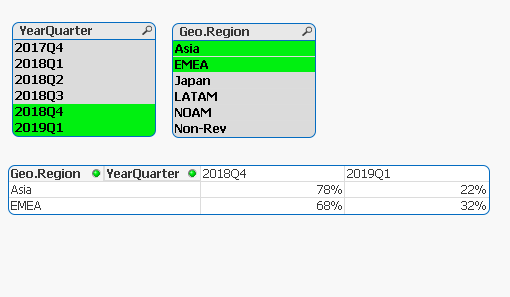
Please find the attached doc , i am trying to display the % by Region for each quarter , but unable to figure out expression , i am able to get expression for individual Region but i want to display 1 row for 1 region, currently my region values are duplicating.
Thanks!
Accepted Solutions

 sunny_talwar
- Mark as New
- Bookmark
- Subscribe
- Mute
- Subscribe to RSS Feed
- Permalink
- Report Inappropriate Content
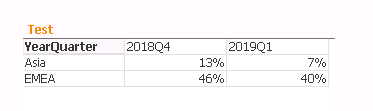
Try these two expression
Alt($(eAdjExtCostAsiaPQ2), $(eAdjExtCostAsiaPQ1))
Alt($(eAdjExtCostEMEAPQ1), $(eAdjExtCostEMEAPQ2))
sunny_talwar
- Mark as New
- Bookmark
- Subscribe
- Mute
- Subscribe to RSS Feed
- Permalink
- Report Inappropriate Content
Try these two expression
Alt($(eAdjExtCostAsiaPQ2), $(eAdjExtCostAsiaPQ1))
Alt($(eAdjExtCostEMEAPQ1), $(eAdjExtCostEMEAPQ2))

 duncanblaine
- Mark as New
- Bookmark
- Subscribe
- Mute
- Subscribe to RSS Feed
- Permalink
- Report Inappropriate Content
Hi Steve
Looks like Sunny just got in there before me 
From what I can see, it looks like the denominator in your Percentages is missing something.
In a simplified example:
Sum({<[SalesOutZyme.Type]={'SPR'}>}SalesOutZyme.AdjExtCost) / Sum(TOTAL <Geo.Region> {<[SalesOutZyme.Type]={'SPR'}>}SalesOutZyme.AdjExtCost)
The TOTAL qualifier will allow the percentage to aggregate across all values in the specified dimension.
I've attached the QVW which includes a new Pivot table which contains the new expressions. You might need to amend to swap in the variables.