Unlock a world of possibilities! Login now and discover the exclusive benefits awaiting you.

- Qlik Community
- :
- All Forums
- :
- QlikView
- :
- Picking the most recent entry, FirstSortedValue, A...
- Subscribe to RSS Feed
- Mark Topic as New
- Mark Topic as Read
- Float this Topic for Current User
- Bookmark
- Subscribe
- Mute
- Printer Friendly Page

- Mark as New
- Bookmark
- Subscribe
- Mute
- Subscribe to RSS Feed
- Permalink
- Report Inappropriate Content
Picking the most recent entry, FirstSortedValue, Aggr
Hello Everyone,
I am trying to pick the most recent entry and display it in a text box. The requirement is to get the most recent Sales for one day, and when none of the filters are selected it should Sum every possible Sales and display it.
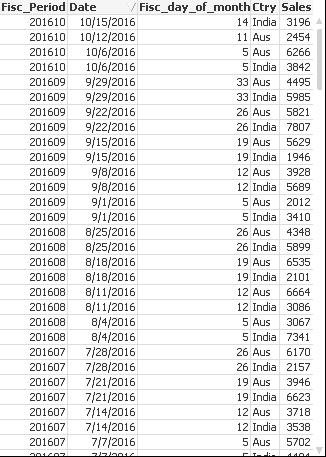 For example, when No Country is selected in the Filter, the text Box should have the Sales as 3196+2454.
However when a country is selected, it should display the actual numbers, India-2454 and Aus-3196.
I have attached the sample application here, please give me your suggestions.
Thanks.
- « Previous Replies
-
- 1
- 2
- Next Replies »
- Mark as New
- Bookmark
- Subscribe
- Mute
- Subscribe to RSS Feed
- Permalink
- Report Inappropriate Content
Can someone help me out here please?
Thanks

 sunny_talwar
- Mark as New
- Bookmark
- Subscribe
- Mute
- Subscribe to RSS Feed
- Permalink
- Report Inappropriate Content
What do you expect to see when no selection had been made and what do you expect to see with 2-3 different selections as an example. I am having a somewhat hard time to imagine what you required output is.
- Mark as New
- Bookmark
- Subscribe
- Mute
- Subscribe to RSS Feed
- Permalink
- Report Inappropriate Content
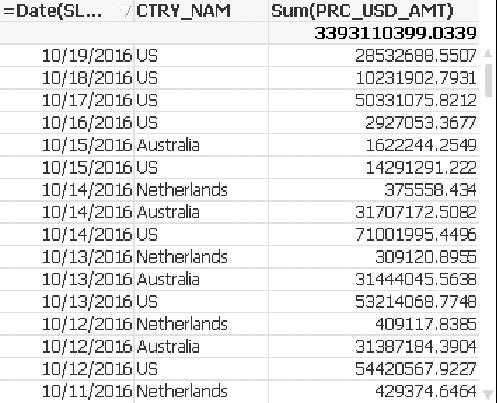 Hello Sunny,
The above image has 3 fields INVC__DT,Country and a measure. Country 'US' has data on 19thOct,Aust on 15thOct and Netherlands on 14th Oct as their recent dates.
When i used the below expression, it will always give me 'US' numbers as it has the most recent date when nothing is selectedin any of the filters. But what i actually want is that it should Sum all the most recent dates for every country, 19th for US, 15th for Austr and 14th For Nether and show it in the text box.
Num(Sum({<DateNum={$(=Num(Max(SLS_RPT_TRNS.INVC__DT)))}>}PRC_USD_AMT)
- Mark as New
- Bookmark
- Subscribe
- Mute
- Subscribe to RSS Feed
- Permalink
- Report Inappropriate Content
Hello,
Can someone help me here please?
Thanks
- Mark as New
- Bookmark
- Subscribe
- Mute
- Subscribe to RSS Feed
- Permalink
- Report Inappropriate Content
Any suggestions on this?
Thanks.
- « Previous Replies
-
- 1
- 2
- Next Replies »