Unlock a world of possibilities! Login now and discover the exclusive benefits awaiting you.

Announcements
Want to see what's currently in public preview? We've pulled it all together in one place. Check it out here
- Qlik Community
- :
- All Forums
- :
- QlikView
- :
- Pivot Table Cell Color
Options
- Subscribe to RSS Feed
- Mark Topic as New
- Mark Topic as Read
- Float this Topic for Current User
- Bookmark
- Subscribe
- Mute
- Printer Friendly Page
Turn on suggestions
Auto-suggest helps you quickly narrow down your search results by suggesting possible matches as you type.
Showing results for

 vanderson009
Creator III
2018-07-30
01:36 AM
- Mark as New
- Bookmark
- Subscribe
- Mute
- Subscribe to RSS Feed
- Permalink
- Report Inappropriate Content
Pivot Table Cell Color
Hi,
I have below data in pivot table,
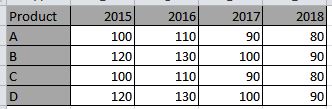
I want to change background color of cell based on condition if previous year sales is less than current then cell background is green else red.
Thanks,
Villyee
924 Views
2 Replies

 petter
Partner - Champion III
2018-07-30
02:13 AM
- Mark as New
- Bookmark
- Subscribe
- Mute
- Subscribe to RSS Feed
- Permalink
- Report Inappropriate Content
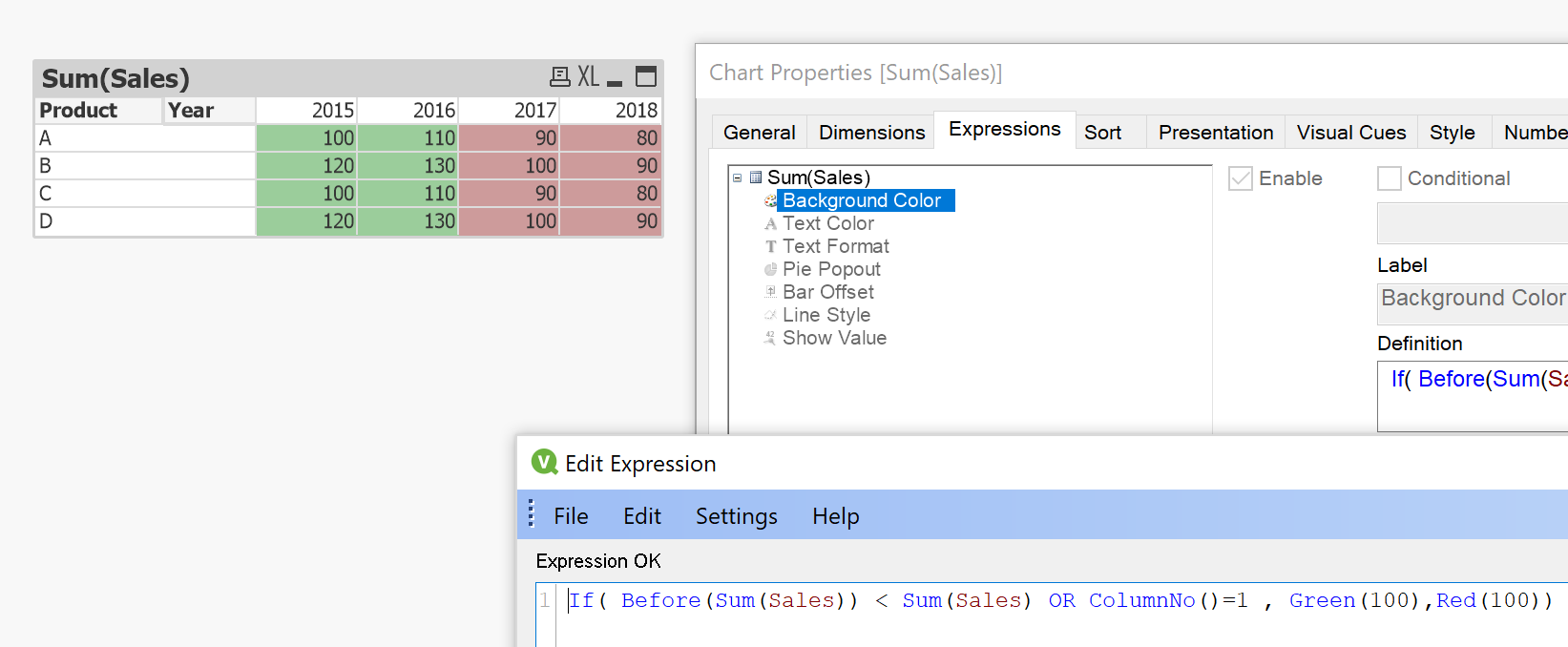
- Go to the properties dialog of the Pivot Chart.
- Select the "Expressions" tab.
- Click the + icon to the left of the Sum(Sales) expression.
- Then select "Background Color" and in the "Definition" add the expression
If( Before(Sum(Sales)) < Sum(Sales) OR ColumnNo()=1 , Green(100),Red(100)) - Click OK.
873 Views
 mtucholski
Creator
2018-07-30
02:13 AM
- Mark as New
- Bookmark
- Subscribe
- Mute
- Subscribe to RSS Feed
- Permalink
- Report Inappropriate Content
if(before(sum(Sale))<sum(Sale),lightgreen(),lightred())
873 Views
