Unlock a world of possibilities! Login now and discover the exclusive benefits awaiting you.

- Qlik Community
- :
- All Forums
- :
- QlikView
- :
- Pivot Table Expression Filtering Clears Previously...
- Subscribe to RSS Feed
- Mark Topic as New
- Mark Topic as Read
- Float this Topic for Current User
- Bookmark
- Subscribe
- Mute
- Printer Friendly Page

- Mark as New
- Bookmark
- Subscribe
- Mute
- Subscribe to RSS Feed
- Permalink
- Report Inappropriate Content
Pivot Table Expression Filtering Clears Previously Selected Dimension Filters
Helo,
I have a pivot table with 4 dimensions (f1, f2, f3, f4) and 1 expression (sum of f5).
Pls check attached sample. I did these steps.
0. Cleared all filters.
1. Clicked on value a1 - this set a filter f1=a1
2. Then clicked on value 2 in the expression.
I was thinking it will keep f1=a1 filter and add f2=b1, f3=c1, f4=d1 but it removed f1=a1 filter and added just f2=b1, f3=c1, f4=d1.
Why would it remove f1=a1 if that filter is still applicable? Is this the default behavior? Is there anything I can do to keep the f1=a1 filter?
Thanks,
VJ

 sunny_talwar
- Mark as New
- Bookmark
- Subscribe
- Mute
- Subscribe to RSS Feed
- Permalink
- Report Inappropriate Content
It did not remove f1 for me
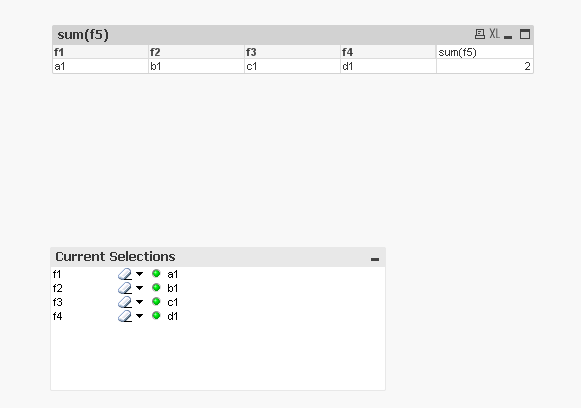
This is what I got after following the steps you mentioned above
- Mark as New
- Bookmark
- Subscribe
- Mute
- Subscribe to RSS Feed
- Permalink
- Report Inappropriate Content
What qlikview version are you in?
Either you have a later version of 11.20.13 or you probably clicked 2 as the first step.
If I directly click 2 without filtering f1 first then it works fine. It is not only f1. If i select f1 and f2 and then click 2, it removes f1 and f2 and keeps only f3 and f4.
sunny_talwar
- Mark as New
- Bookmark
- Subscribe
- Mute
- Subscribe to RSS Feed
- Permalink
- Report Inappropriate Content
I am on version 12 and I first clicked on f1 = 'a1' and then on 2 directly in the expression column
- Mark as New
- Bookmark
- Subscribe
- Mute
- Subscribe to RSS Feed
- Permalink
- Report Inappropriate Content
Thanks. Looks like they fixed it in 12.