Unlock a world of possibilities! Login now and discover the exclusive benefits awaiting you.

- Qlik Community
- :
- All Forums
- :
- QlikView
- :
- Pivot Table Total Is Wrong
- Subscribe to RSS Feed
- Mark Topic as New
- Mark Topic as Read
- Float this Topic for Current User
- Bookmark
- Subscribe
- Mute
- Printer Friendly Page

 dineshm030
- Mark as New
- Bookmark
- Subscribe
- Mute
- Subscribe to RSS Feed
- Permalink
- Report Inappropriate Content
Pivot Table Total Is Wrong
Hi Friends,
I have created the pivot table but the highlighted total is wrong. Could please tell me the reason?
Below the image is for your reference.
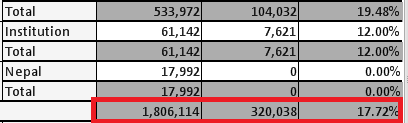
Thanks in advance.
Accepted Solutions

 kaushiknsolanki
- Mark as New
- Bookmark
- Subscribe
- Mute
- Subscribe to RSS Feed
- Permalink
- Report Inappropriate Content
Try this,
Sum(Aggr(Your Expression,Your dimensions))
For example.
Sum(Aggr(Sum(Sales),Region,State))
Regards,
Kaushik Solanki

- Mark as New
- Bookmark
- Subscribe
- Mute
- Subscribe to RSS Feed
- Permalink
- Report Inappropriate Content
May be share sample application
 sunny_talwar
- Mark as New
- Bookmark
- Subscribe
- Mute
- Subscribe to RSS Feed
- Permalink
- Report Inappropriate Content
What is your dimension and what is your expression here?

 krishnacbe
- Mark as New
- Bookmark
- Subscribe
- Mute
- Subscribe to RSS Feed
- Permalink
- Report Inappropriate Content
What is your expected Total?
If it is just sum of the rows select the option Expression Tab -> Total Mode -> Sum of Rows
If you want the Expression total just provide Expression Tab -> Total Mode -> Expression Total
kaushiknsolanki
- Mark as New
- Bookmark
- Subscribe
- Mute
- Subscribe to RSS Feed
- Permalink
- Report Inappropriate Content
Try this,
Sum(Aggr(Your Expression,Your dimensions))
For example.
Sum(Aggr(Sum(Sales),Region,State))
Regards,
Kaushik Solanki
dineshm030
- Mark as New
- Bookmark
- Subscribe
- Mute
- Subscribe to RSS Feed
- Permalink
- Report Inappropriate Content
Yeah It is working fine bro. Thank you so much.
