Unlock a world of possibilities! Login now and discover the exclusive benefits awaiting you.

- Qlik Community
- :
- All Forums
- :
- QlikView
- :
- Pivot table % Totals
- Subscribe to RSS Feed
- Mark Topic as New
- Mark Topic as Read
- Float this Topic for Current User
- Bookmark
- Subscribe
- Mute
- Printer Friendly Page

- Mark as New
- Bookmark
- Subscribe
- Mute
- Subscribe to RSS Feed
- Permalink
- Report Inappropriate Content
Pivot table % Totals
Hi all,
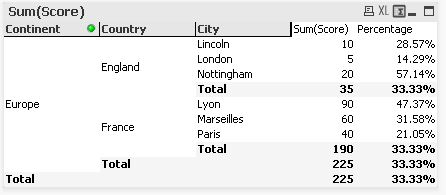
I have a pivot table as shown below. there is an expression which calculates the % which is working per line but the subtotals and totals are not working. (As you can see it shows 33.33% for each.
Does anyone know how i can fix this please?
The expressions used are ..
Score
Sum(Score)
Percentage
=sum(Score)/sum({<City=>}(aggr(NODISTINCT sum( Score), Country)))
- Tags:
- new_to_qlikview
Accepted Solutions

 Gysbert_Wassena
- Mark as New
- Bookmark
- Subscribe
- Mute
- Subscribe to RSS Feed
- Permalink
- Report Inappropriate Content
Try:
if(Dimensionality()=3, sum(Score)/sum(total <Country,Continent> Score),
if(Dimensionality()=2, sum(Score)/sum(total <Continent> Score),
sum(Score)/sum(total Score)))
talk is cheap, supply exceeds demand
- Mark as New
- Bookmark
- Subscribe
- Mute
- Subscribe to RSS Feed
- Permalink
- Report Inappropriate Content
Hi
Try this:
=sum(Score)/sum(TOTAL<City> aggr(sum(Score),Continent,Country, City))
TMF
Message was edited by: tmendesf
- Mark as New
- Bookmark
- Subscribe
- Mute
- Subscribe to RSS Feed
- Permalink
- Report Inappropriate Content
Hi TMF,
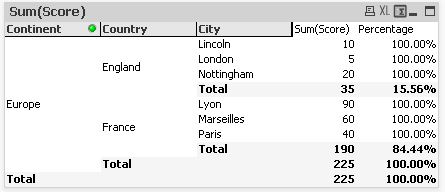
That works for the totals but now each line reports as 100% as below
- Mark as New
- Bookmark
- Subscribe
- Mute
- Subscribe to RSS Feed
- Permalink
- Report Inappropriate Content
Hi
Try this:
=sum(Score)/sum(TOTAL<City> aggr(sum(Score),Continent,Country))
TMF
- Mark as New
- Bookmark
- Subscribe
- Mute
- Subscribe to RSS Feed
- Permalink
- Report Inappropriate Content
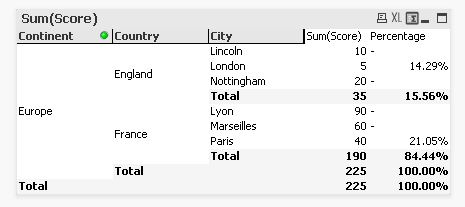
Hi, thanks again but now im getting some lines reporting nothing..
Nottingham for example should be reporting 20/35*100 = 57.14% but is showing -
- Mark as New
- Bookmark
- Subscribe
- Mute
- Subscribe to RSS Feed
- Permalink
- Report Inappropriate Content
Can you post a sample file?
- Mark as New
- Bookmark
- Subscribe
- Mute
- Subscribe to RSS Feed
- Permalink
- Report Inappropriate Content
Hi, yes here is a sample
Gysbert_Wassena- Mark as New
- Bookmark
- Subscribe
- Mute
- Subscribe to RSS Feed
- Permalink
- Report Inappropriate Content
Try:
if(Dimensionality()=3, sum(Score)/sum(total <Country,Continent> Score),
if(Dimensionality()=2, sum(Score)/sum(total <Continent> Score),
sum(Score)/sum(total Score)))
talk is cheap, supply exceeds demand