Unlock a world of possibilities! Login now and discover the exclusive benefits awaiting you.

- Qlik Community
- :
- All Forums
- :
- QlikView
- :
- Re: Pop-up pie chart.
- Subscribe to RSS Feed
- Mark Topic as New
- Mark Topic as Read
- Float this Topic for Current User
- Bookmark
- Subscribe
- Mute
- Printer Friendly Page

 edson_souza
- Mark as New
- Bookmark
- Subscribe
- Mute
- Subscribe to RSS Feed
- Permalink
- Report Inappropriate Content
Pop-up pie chart.
Dear, good afternoon.
I have the following problem:
I created a pie chart with a scale (Country) and two expressions (Percentage and value) of sales and ordered the exhibition by descending value-Y. I scored as a percentage relative, and for the value to be displayed, I needed to mark the check-box "Text as Pop-up". Now the problem: by positioning the mouse on the first slice pop-up displays the percentage and its value. By dwelling on the second slice is displayed it and the percentage values of the first and second slice. By positioning the third slice is shown the percentage of it and the value of the first three slices. And so on. As print below:
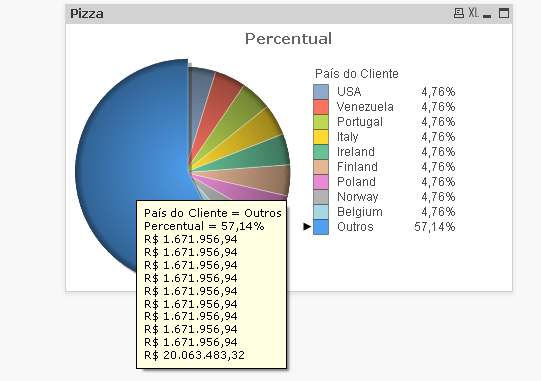
I think it would only display the correct value of the share which find mouse positioned. Follow the QVW attached, please help me. I'm using QlikView 11.

 edg_baltazar
- Mark as New
- Bookmark
- Subscribe
- Mute
- Subscribe to RSS Feed
- Permalink
- Report Inappropriate Content
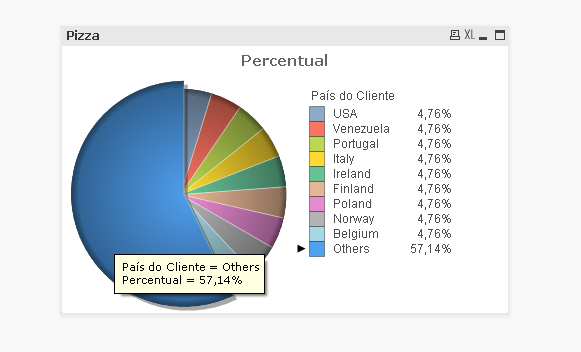
Hello Edson! , check the attached .qvw , i only disable the second expression of your chart and now its ok the pop up , Regards!

- Mark as New
- Bookmark
- Subscribe
- Mute
- Subscribe to RSS Feed
- Permalink
- Report Inappropriate Content
You don't need to check Text as Pop-up. When it is unchecked you get what you want. See the attached qvw - with Cycle (group) button for your expressions.
Regards,
B.
edson_souza
- Mark as New
- Bookmark
- Subscribe
- Mute
- Subscribe to RSS Feed
- Permalink
- Report Inappropriate Content
Hello Edgar Baltazar, disabling the second expression I lose valuable information. What is the goal. Still, thank you.
Hello Borislav, your suggestion meets my needs. Grateful.
However, it would have some way to display the two values in the same pop-up without grouping expressions?
Thank you,
Edson de Souza.