Unlock a world of possibilities! Login now and discover the exclusive benefits awaiting you.

- Qlik Community
- :
- All Forums
- :
- QlikView
- :
- Previous Year
- Subscribe to RSS Feed
- Mark Topic as New
- Mark Topic as Read
- Float this Topic for Current User
- Bookmark
- Subscribe
- Mute
- Printer Friendly Page

 jjking58
- Mark as New
- Bookmark
- Subscribe
- Mute
- Subscribe to RSS Feed
- Permalink
- Report Inappropriate Content
Previous Year
I've tried all ways to produce a straight table for a previous year using a fiscal Calendar. I have been able to create a current year table with the help of the Qlikview community which works perfectly. Can someone show me what i'm doing wrong.
Thank you in advance.
Jim
Here is my Fiscal Calendar and load script for the file driving the calendar All i need is a set analysis expression to retrieve the previous year amount.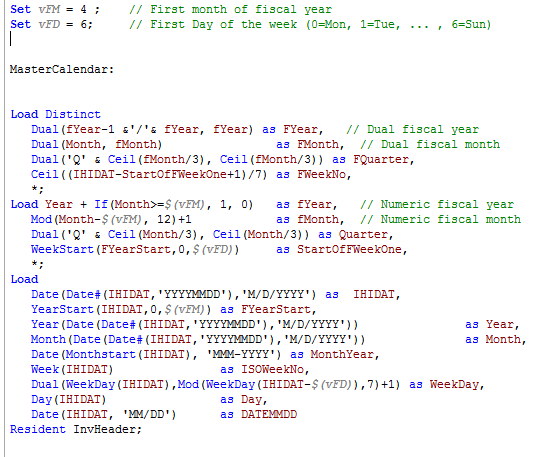
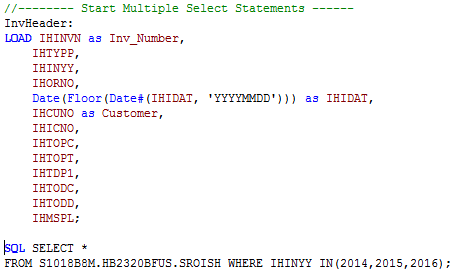
Here is the expression i'm using to select the previous data
sum({<IHIDAT = {">=$(AddYears(FYearStart,-1)<=$(FYearStart)"}>}Amount)

 sunny_talwar
- Mark as New
- Bookmark
- Subscribe
- Mute
- Subscribe to RSS Feed
- Permalink
- Report Inappropriate Content
What is FYearStart a variable? How is it defined? May be try this:
Sum({<IHIDAT = {">=$(=Date(AddYears(FYearStart,-1), 'M/D/YYYY'))<=$(=Date(FYearStart, 'M/D/YYYY'))"}>}Amount)
jjking58
- Mark as New
- Bookmark
- Subscribe
- Mute
- Subscribe to RSS Feed
- Permalink
- Report Inappropriate Content
I tried your suggestion and show no data
FYearStart comes from the Fiscal Calendar script. Should I be comparing IHIDAT which is the invoice date from the table and the field used to create the Fiscal Calendar.
sunny_talwar
- Mark as New
- Bookmark
- Subscribe
- Mute
- Subscribe to RSS Feed
- Permalink
- Report Inappropriate Content
Can you just do this?
Sum({<FYearStart= {"$(=Date(Max(FYearStart)))"}>}Amount)

 alan_richmond
- Mark as New
- Bookmark
- Subscribe
- Mute
- Subscribe to RSS Feed
- Permalink
- Report Inappropriate Content
these are the variable I use
sLYear | =sTYear-1 |
sTYear | =Year |
mTYSalesVal | Num(Sum(SalesValue * $(vIncludeTrailers))/vRound,'$#,##0') |
mLYSalesVal | Num(Sum({$<Year={$(sLYear)}>} SalesValue * $(vIncludeTrailers))/vRound,'$#,##0') |
jjking58
- Mark as New
- Bookmark
- Subscribe
- Mute
- Subscribe to RSS Feed
- Permalink
- Report Inappropriate Content
That gives me the current year.
jjking58
- Mark as New
- Bookmark
- Subscribe
- Mute
- Subscribe to RSS Feed
- Permalink
- Report Inappropriate Content
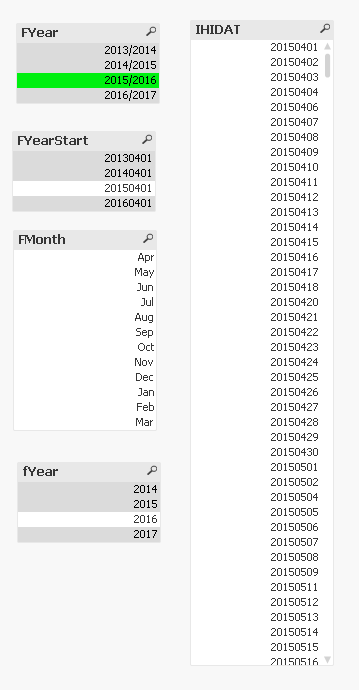
when i display the contents of IHIDAT it only shows the dates from the selection made ex.(2014/2015) excludes all 2016 data. Would this cause the previous or current years data from be processed?
sunny_talwar
- Mark as New
- Bookmark
- Subscribe
- Mute
- Subscribe to RSS Feed
- Permalink
- Report Inappropriate Content
May be this:
Sum({<FYearStart= {"$(=Date(AddYears(Max(FYearStart), -1)))"}, IHIDAT>}Amount)
Make sure to ignore selections in other date related fields where you plan to make selections. I have added IHIDAT, you can add others the same way
jjking58
- Mark as New
- Bookmark
- Subscribe
- Mute
- Subscribe to RSS Feed
- Permalink
- Report Inappropriate Content
Sunny,
Still no luck. Displays no data. I've included a screen shot showing the selection of 2015/2016 the IHIDAT only includes dates 20150401- 20160331 (April is the start of fiscal period). There are no records in IHIDAT for 20140401- 2015331. Could this be why the above statement does not work? Is there a way around this and include all records between 2013-2017
Thanks for spending so much time on this.