Unlock a world of possibilities! Login now and discover the exclusive benefits awaiting you.

- Qlik Community
- :
- All Forums
- :
- QlikView
- :
- Previous year values table
- Subscribe to RSS Feed
- Mark Topic as New
- Mark Topic as Read
- Float this Topic for Current User
- Bookmark
- Subscribe
- Mute
- Printer Friendly Page

 capriconuser
- Mark as New
- Bookmark
- Subscribe
- Mute
- Subscribe to RSS Feed
- Permalink
- Report Inappropriate Content
Previous year values table
I have this type of data
Category	Year	Revenue
Product A	2017	213
Product B	2017	345
Product C	2017	2545
Product D	2017	3455
Product A	2018	4563
Product B	2018	45677
Product C	2018	6874
Product D	2018	45366
Product A	2019	9672
Product B	2019	45782
Product C	2019	23490
Product D	2019	90124
Product A	2020	8724
Product B	2020	8728
Product C	2020	124
Product D	2020	9812
I want previous year data like this
Category	2017	2018	2019	2020
Product A	213	4563	9672	8724
Product B	345	45677	45782	8728
Product C	2545	6874	23490	124
Product D	3455	45366	90124	9812
I want previous year data like this .. I get previous year data through this
Sum({$ <[Year] = {$(=Max([Year]) - 1)} >} Revenue)
formula..
When I click on 2020 then then 2019 fig shows as 9672 on below table (here 2020 is considered as 2019 , 2019 for 2018, 2018 for 2017 ) .. but this return only 1 year where as I want all year like below table… if you notice values is once step back from above table
Category	2017	2018	2019	2020
Product A	-	213	4563	9672
Product B	-	345	45677	45782
Product C	-	2545	6874	23490
Product D - 3455 45366 90124- « Previous Replies
-
- 1
- 2
- Next Replies »

 Taoufiq_Zarra
- Mark as New
- Bookmark
- Subscribe
- Mute
- Subscribe to RSS Feed
- Permalink
- Report Inappropriate Content
with the formula
Sum({$ < [Year] = {$(=Max([Year]) - 1)} >} Revenue)
and if you click on 2020 it is normal that the values returned are those of 2019
Max(Year)->2020 Max(Year)-1->2019
for the Table, maye be :
Sum({$ < [Year] = {$(=Max([Year]) )} >} Revenue)->2020
Sum({$ < [Year] = {$(=Max([Year]) - 1)} >} Revenue)->2019
Sum({$ < [Year] = {$(=Max([Year]) - 2)} >} Revenue)->2018
...
If I understood the question correctly ....
Taoufiq ZARRA
"Please LIKE posts and "Accept as Solution" if the provided solution is helpful "
(you can mark up to 3 "solutions") 😉
capriconuser
- Mark as New
- Bookmark
- Subscribe
- Mute
- Subscribe to RSS Feed
- Permalink
- Report Inappropriate Content
when i tried your solution i got this
| Year | 2017 | 2018 | 2019 | ||||||
| Category | 2019 | 2018 | 2017 | 2019 | 2018 | 2017 | 2019 | 2018 | 2017 |
| Product A | 0 | 0 | 213 | 0 | 4563 | 0 | 9672 | 0 | 0 |
| Product B | 0 | 0 | 345 | 0 | 45677 | 0 | 45782 | 0 | 0 |
| Product C | 0 | 0 | 2545 | 0 | 6874 | 0 | 23490 | 0 | 0 |
| Product D | 0 | 0 | 3455 | 0 | 45366 | 0 | 90124 | 0 | 0 |
but i want result like this
| Year | 2017 | 2018 | 2019 | 2020 |
| Category | ||||
| Product A | - | 213 | 4563 | 9672 |
| Product B | - | 345 | 45677 | 45782 |
| Product C | - | 2545 | 6874 | 23490 |
| Product D | - | 3455 | 45366 | 90124 |
Taoufiq_Zarra
- Mark as New
- Bookmark
- Subscribe
- Mute
- Subscribe to RSS Feed
- Permalink
- Report Inappropriate Content
Qlikview or qliksense ?
Taoufiq ZARRA
"Please LIKE posts and "Accept as Solution" if the provided solution is helpful "
(you can mark up to 3 "solutions") 😉
capriconuser
- Mark as New
- Bookmark
- Subscribe
- Mute
- Subscribe to RSS Feed
- Permalink
- Report Inappropriate Content
qlikview check attaced file. @Taoufiq_Zarra
when i try ur soultion i got result in different format. check table in qlikview file
whereas i want results like this
| Year | 2017 | 2018 | 2019 | 2020 |
| Category | ||||
| Product A | - | 213 | 4563 | 9672 |
| Product B | - | 345 | 45677 | 45782 |
| Product C | - | 2545 | 6874 | 23490 |
| Product D | - | 3455 | 45366 | 90124 |
Taoufiq_Zarra
- Mark as New
- Bookmark
- Subscribe
- Mute
- Subscribe to RSS Feed
- Permalink
- Report Inappropriate Content
Sheet1
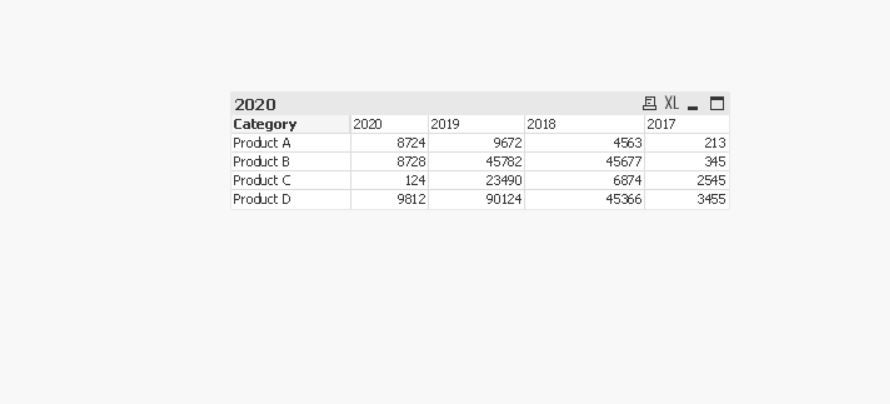
Taoufiq ZARRA
"Please LIKE posts and "Accept as Solution" if the provided solution is helpful "
(you can mark up to 3 "solutions") 😉
capriconuser
- Mark as New
- Bookmark
- Subscribe
- Mute
- Subscribe to RSS Feed
- Permalink
- Report Inappropriate Content
hi ...i
could you please paste formula here ..
and the picture you posted if this is result then this is not what i want .. i already told you what i want 2019 figures in 2020 .. 2018 figures in 2019 and 2017 figures in 2018.. and for 2017 this should be dash "-" because from 2017 onward there is no previous year..
please paste formula here..
my qilkview licence is expire.. thats why i unable to open the file @Taoufiq_Zarra
capriconuser
- Mark as New
- Bookmark
- Subscribe
- Mute
- Subscribe to RSS Feed
- Permalink
- Report Inappropriate Content
Taoufiq_Zarra
- Mark as New
- Bookmark
- Subscribe
- Mute
- Subscribe to RSS Feed
- Permalink
- Report Inappropriate Content
I'm not sure if I understood you correctly, but In qlikview:
create a pivot table ->
dimension : Category
Mesures:
| Label | Expression |
| =prev_year+1 | Sum({$ < [Year] = {$(=Max([Year])-1 )} >} Revenue) |
| =prev_year | Sum({$ < [Year] = {$(=Max([Year])-2 )} >} Revenue) |
| =prev_year-1 | Sum({$ < [Year] = {$(=Max([Year])-3 )} >} Revenue) |
| =prev_year-2 | Sum({$ < [Year] = {$(=Max([Year])-4 )} >} Revenue) |
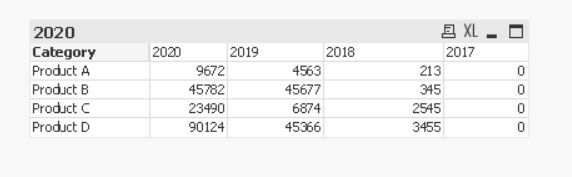
Taoufiq ZARRA
"Please LIKE posts and "Accept as Solution" if the provided solution is helpful "
(you can mark up to 3 "solutions") 😉
 alex00321
- Mark as New
- Bookmark
- Subscribe
- Mute
- Subscribe to RSS Feed
- Permalink
- Report Inappropriate Content
I think Zarra's answer is almost right, i updated a little to let it look like this.
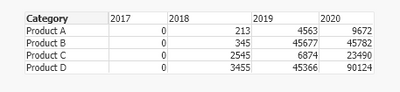
The formula is Sum({$ < [Year] = {$(=Max([Year])-1)} >} Revenue) and you should insert 4 expressions for each year. The label for the expression I put above is =prev_year+1. prev_year is a variable use this: =Max(Year)-1

- « Previous Replies
-
- 1
- 2
- Next Replies »