Unlock a world of possibilities! Login now and discover the exclusive benefits awaiting you.

- Qlik Community
- :
- All Forums
- :
- QlikView
- :
- Problem accessing application on server through Ql...
- Subscribe to RSS Feed
- Mark Topic as New
- Mark Topic as Read
- Float this Topic for Current User
- Bookmark
- Subscribe
- Mute
- Printer Friendly Page

- Mark as New
- Bookmark
- Subscribe
- Mute
- Subscribe to RSS Feed
- Permalink
- Report Inappropriate Content
Problem accessing application on server through QlikView Desktop
Hi,
I created an application, deployed on a server, with section access and web ticketing. When connecting as a user, all is working well.
Now I would like to be able to connect through QlikView Desktop on my server

That's working, I can access my application with DMS authentication, but in section access the user DSK-TDECHIRON has access ADMIN, and when I'm connecting I got the access USER:
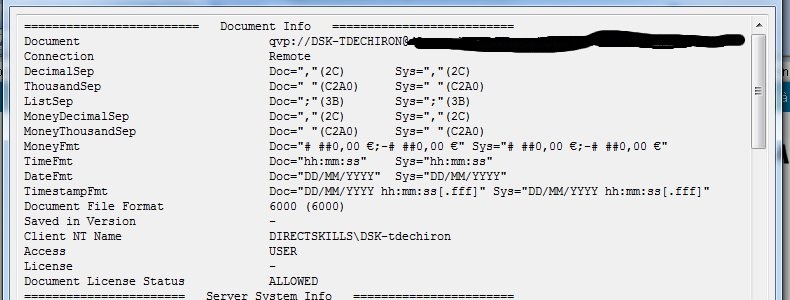
I have no idea where could be the problem, could you help me?
Accepted Solutions

 Peter_Cammaert
- Mark as New
- Bookmark
- Subscribe
- Mute
- Subscribe to RSS Feed
- Permalink
- Report Inappropriate Content
When you do a "Open in Server"; you're actually using a desktop as a regular QlikView client for visiting the AccessPoint, just like the QlikView plug-in or your Browser. That means you will revert to USER access, like everybody else who visits an AccessPoint.
Peter
Peter_Cammaert
- Mark as New
- Bookmark
- Subscribe
- Mute
- Subscribe to RSS Feed
- Permalink
- Report Inappropriate Content
When you do a "Open in Server"; you're actually using a desktop as a regular QlikView client for visiting the AccessPoint, just like the QlikView plug-in or your Browser. That means you will revert to USER access, like everybody else who visits an AccessPoint.
Peter
 jchoucq
- Mark as New
- Bookmark
- Subscribe
- Mute
- Subscribe to RSS Feed
- Permalink
- Report Inappropriate Content
hi,
the ADMIN and USER property in a section access is only useful when opening a qvw file with Qlikview Desktop.
Opening an application with 'Open in Server ..." option, is exactly the same as using a web navigator. Everybody becomes user in this case.
hope this helps.
Regards.
Johann
- Mark as New
- Bookmark
- Subscribe
- Mute
- Subscribe to RSS Feed
- Permalink
- Report Inappropriate Content
Thanks Peter and Johann!