Unlock a world of possibilities! Login now and discover the exclusive benefits awaiting you.

- Qlik Community
- :
- All Forums
- :
- QlikView
- :
- Projections Maintaining Organisation Data Unaffect...
- Subscribe to RSS Feed
- Mark Topic as New
- Mark Topic as Read
- Float this Topic for Current User
- Bookmark
- Subscribe
- Mute
- Printer Friendly Page

- Mark as New
- Bookmark
- Subscribe
- Mute
- Subscribe to RSS Feed
- Permalink
- Report Inappropriate Content
Projections Maintaining Organisation Data Unaffected
I have the following organizations which are representative of the national retail pharmacy universe:
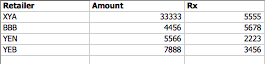
Now i want to project the data to national level in order to get estimates for the country. At load time i have the following:
LOAD Amount*3,
Rx*3;
FROM ...........
In other words, we are projecting the national level figures by multiplying by a factor of 3.
The problem with the above is that each organization (Retailer)'s original data will be multiplied by a factor of 3 and when one filters by Retailer to get their share of the market, the resulting figure will be errorneous.
How can one make such a projection in QV without affecting each individual retailer's figures?
Regards.
- Tags:
- new_to_qlikview
Accepted Solutions

 sunny_talwar
- Mark as New
- Bookmark
- Subscribe
- Mute
- Subscribe to RSS Feed
- Permalink
- Report Inappropriate Content
Is the requirement that if you select RETAILPHARMACY you see * 3 or when you have nothing selected you have * 3?
Try this if nothing is selected is * 3
=If(GetSelectedCount(RETAILPHARMACY) > 0, Num(Sum({$<$(vSetMTD)>}Amount), '$##,##0.00'), Num((Sum({$<$(vSetMTD)>}Amount)*3), '$##,##0.00'))
sunny_talwar
- Mark as New
- Bookmark
- Subscribe
- Mute
- Subscribe to RSS Feed
- Permalink
- Report Inappropriate Content
May be just bring Amount and Rx (without multiplying it by 3) and on the front end use the expression like this:
If(GetFieldSelections(Retailer) > 0, Sum(Amount * 3), Sum(Amount))
If(GetFieldSelections(Retailer) > 0, Sum(Rx * 3), Sum(Rx))
- Mark as New
- Bookmark
- Subscribe
- Mute
- Subscribe to RSS Feed
- Permalink
- Report Inappropriate Content
Thanks Sunny, i will use your recommendations and advise accordingly.
Regards,
- Mark as New
- Bookmark
- Subscribe
- Mute
- Subscribe to RSS Feed
- Permalink
- Report Inappropriate Content
Hi Sunny
Further to my last positing, i have the following expression as per your recommendation:
=If(GetFieldSelections(RETAILPHARMACY) > 0, Num((Sum({$<$(vSetMTD)>}Amount))*3, '$##,##0.00'), Num(Sum({$<$(vSetMTD)>}Amount), '$##,##0.00'))
However, using this does not change my values to projected with or without any selections.
sunny_talwar
- Mark as New
- Bookmark
- Subscribe
- Mute
- Subscribe to RSS Feed
- Permalink
- Report Inappropriate Content
Sorry I gave you the incorrect function
It should be GetSelectedCount(). Try this:
=If(GetSelectedCount(RETAILPHARMACY) > 0,Num((Sum({$<$(vSetMTD)>}Amount))*3, '$##,##0.00'), Num(Sum({$<$(vSetMTD)>}Amount), '$##,##0.00'))
- Mark as New
- Bookmark
- Subscribe
- Mute
- Subscribe to RSS Feed
- Permalink
- Report Inappropriate Content
Hi Sunny, even with the new function my data is not getting projected x3 as required.
sunny_talwar
- Mark as New
- Bookmark
- Subscribe
- Mute
- Subscribe to RSS Feed
- Permalink
- Report Inappropriate Content
Is the requirement that if you select RETAILPHARMACY you see * 3 or when you have nothing selected you have * 3?
Try this if nothing is selected is * 3
=If(GetSelectedCount(RETAILPHARMACY) > 0, Num(Sum({$<$(vSetMTD)>}Amount), '$##,##0.00'), Num((Sum({$<$(vSetMTD)>}Amount)*3), '$##,##0.00'))
- Mark as New
- Bookmark
- Subscribe
- Mute
- Subscribe to RSS Feed
- Permalink
- Report Inappropriate Content
Many thanks Sunny that is now working, i now need to change all expressions on the front end.