Unlock a world of possibilities! Login now and discover the exclusive benefits awaiting you.

- Qlik Community
- :
- All Forums
- :
- QlikView
- :
- QVS Logs Timestamp
- Subscribe to RSS Feed
- Mark Topic as New
- Mark Topic as Read
- Float this Topic for Current User
- Bookmark
- Subscribe
- Mute
- Printer Friendly Page

- Mark as New
- Bookmark
- Subscribe
- Mute
- Subscribe to RSS Feed
- Permalink
- Report Inappropriate Content
QVS Logs Timestamp
We upgraded from 11.20 SR 15 to QV 12.10 SR 3. The time format has changed in QVS logs. I would like to know if there is a way to change the timestamp format back to what it was in 11.20? Please see the attachment.
- Mark as New
- Bookmark
- Subscribe
- Mute
- Subscribe to RSS Feed
- Permalink
- Report Inappropriate Content
Check once in Environmental variables to change time format

 antose
- Mark as New
- Bookmark
- Subscribe
- Mute
- Subscribe to RSS Feed
- Permalink
- Report Inappropriate Content
Hi! I also noted this when I did the first upgrade to v12 and my applications where I read the log files stop working.
I change my script to following (example)

timestamp(Timestamp(Timestamp#(Replace(Left(Timestamp,15),'T',' '), 'YYYYMMDD hhmmss')),'YYYY-MM-DD hh:mm:ss') AS LogTimeStamp

 vasilev
- Mark as New
- Bookmark
- Subscribe
- Mute
- Subscribe to RSS Feed
- Permalink
- Report Inappropriate Content
Hi Santosh,
I have the same problem after upgrate to version 12. Now show the governance dashboard from Qlik the time two hours earlier. Maybe because of the last 4 strings after the plus sign "20170330T050825.000+0200"?
- Mark as New
- Bookmark
- Subscribe
- Mute
- Subscribe to RSS Feed
- Permalink
- Report Inappropriate Content
I contacted Qlik support to get a resolution but they said this will be the format moving forward. Qlik sense has the same format. So we ended up using ETL to change the format.

 MarcoWedel
- Mark as New
- Bookmark
- Subscribe
- Mute
- Subscribe to RSS Feed
- Permalink
- Report Inappropriate Content
Hi,
I think QlikView 12 now supports ISO timestamps:
So one solution might be just:
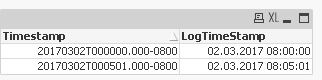
table1:
LOAD Timestamp,
    Timestamp(Timestamp) as LogTimeStamp
FROM [https://community.qlik.com/servlet/JiveServlet/download/1224005-268144/Performance_After%20Upgrade.l...] (txt, utf8, embedded labels, delimiter is '\t', msq);
hope this helps
regards
Marco

 gino_scheppers
- Mark as New
- Bookmark
- Subscribe
- Mute
- Subscribe to RSS Feed
- Permalink
- Report Inappropriate Content
Hi,
I'm using QVSystemMonitor_v5.1.23.qvw. And I've the impression the System Monitor also struggles with this new timestamp format. After upgrade to QlikView 12, the reload failed.
Yesterday, when looking in the log-files, I noticed a change in format of the timestamp.
Has anyone already fixed this issue?
Regards,
Gino
vasilev
- Mark as New
- Bookmark
- Subscribe
- Mute
- Subscribe to RSS Feed
- Permalink
- Report Inappropriate Content
Hi Gino,
Unfortulatelly you have to customize the "QVSystemMonitor_v5.1.23.qvw" for QV 12. To avoid this work I recommend you to use the Governance Dashboard. This App is supported from Qlik and actually works. The only problem with this one is a time difference because of the new timestamp format. I have logged a case at Qlik regarding this issue. I am waiting for response now. I am going to write again if I have any furher information.
Regards,
Rumen
gino_scheppers
- Mark as New
- Bookmark
- Subscribe
- Mute
- Subscribe to RSS Feed
- Permalink
- Report Inappropriate Content
Hi Rumen,
thx for the quick response. I'll wait for the answer.
Regads,
Gino