Unlock a world of possibilities! Login now and discover the exclusive benefits awaiting you.

- Qlik Community
- :
- All Forums
- :
- QlikView
- :
- Qlik: Rounding Errors
- Subscribe to RSS Feed
- Mark Topic as New
- Mark Topic as Read
- Float this Topic for Current User
- Bookmark
- Subscribe
- Mute
- Printer Friendly Page

- Mark as New
- Bookmark
- Subscribe
- Mute
- Subscribe to RSS Feed
- Permalink
- Report Inappropriate Content
Qlik: Rounding Errors
Hi,
I have a scenario where I am displaying percentages from a source column eg.:
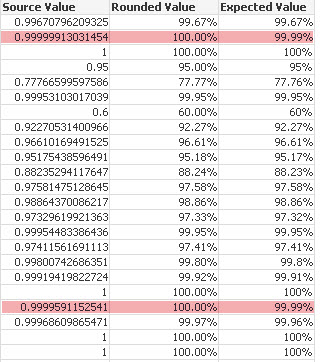
The values are just getting rounded off as I want to show the number as a percentage with 2 decimal places. I have been using the following syntax but it does not help:
Num(Source Value, ####.##)
What I am really looking for is the equivalent of a TRUNC function in Informatica where you could simply truncate upto 'n' decimal places. I am not sure if Ceil or Floor would help either. Please suggest
- Tags:
- new_to_qlikview
Accepted Solutions

 morganaaron
- Mark as New
- Bookmark
- Subscribe
- Mute
- Subscribe to RSS Feed
- Permalink
- Report Inappropriate Content
The floor function would be best for you, if you want it to 2 d.p. use Floor([Source Value], 0.0001) and then show in percentage at 2 d.p., and it should give you what you want.
morganaaron
- Mark as New
- Bookmark
- Subscribe
- Mute
- Subscribe to RSS Feed
- Permalink
- Report Inappropriate Content
The floor function would be best for you, if you want it to 2 d.p. use Floor([Source Value], 0.0001) and then show in percentage at 2 d.p., and it should give you what you want.
- Mark as New
- Bookmark
- Subscribe
- Mute
- Subscribe to RSS Feed
- Permalink
- Report Inappropriate Content
Great ! That worked perfectly