Unlock a world of possibilities! Login now and discover the exclusive benefits awaiting you.

- Qlik Community
- :
- All Forums
- :
- QlikView
- :
- QlikView- Pivot Table- Highlight highest value in ...
- Subscribe to RSS Feed
- Mark Topic as New
- Mark Topic as Read
- Float this Topic for Current User
- Bookmark
- Subscribe
- Mute
- Printer Friendly Page

 Maveer
- Mark as New
- Bookmark
- Subscribe
- Mute
- Subscribe to RSS Feed
- Permalink
- Report Inappropriate Content
QlikView- Pivot Table- Highlight highest value in different color as per cyclic dimension- Expand/Collapse
When user selects first cyclic dimension , highest value gets highlighted in Yellow for each row respective to that.

When user selects second cyclic dimension , highest value gets highlighted in Yellow for each row respective to that.
Where as If we see first 2 rows , the color highlight gone away
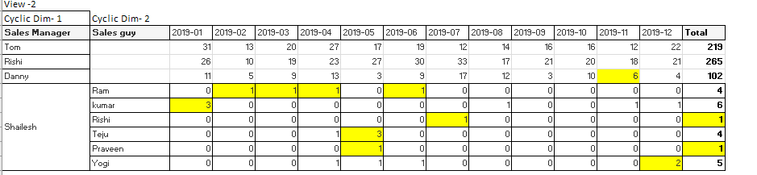
When user hides second cyclic dimension , still the color highlight gone away for the first 2 rows

Highlight is done by using Chart- expression - Background Color
if(count(distinct [Sales ID])= Max(total <[Sales Manager],[Sales Guy]>aggr(count(distinct [Sales ID]),[Sales Manager],[Sales Guy],[Year-Month])),yellow(),white())
Note:- I have multiple column in cyclic dimension. 3 cyclic dimension is used
Please help on this .
