Unlock a world of possibilities! Login now and discover the exclusive benefits awaiting you.

- Qlik Community
- :
- All Forums
- :
- QlikView
- :
- QlikView Server Service is Disconneted
- Subscribe to RSS Feed
- Mark Topic as New
- Mark Topic as Read
- Float this Topic for Current User
- Bookmark
- Subscribe
- Mute
- Printer Friendly Page

- Mark as New
- Bookmark
- Subscribe
- Mute
- Subscribe to RSS Feed
- Permalink
- Report Inappropriate Content
QlikView Server Service is Disconneted
Hello Everyone,
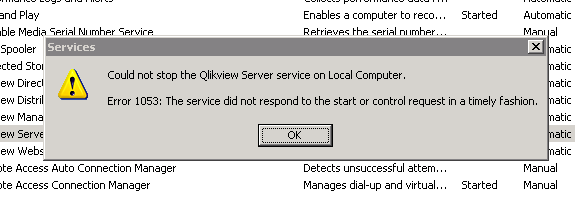
The QlikView Server service (QVS@localhost) is disconnected. and other services (DSC@localhost, QVWS@localhost and ReloadEngine@ddd12wo3a) are running fine. I tried going into the windows server where this QLikview server is installed and restarted the Qlikview server service( Due to some reason it is showing some error, please fin it in the screen shot). So, I restated the windows server, then in QMC I found that all the services are running fine, But later after few mins it QVS service got disconnected again. I tried restarting the server many times(4/5 times) but no use. Could anyone help me this. This is really urgent.
Thanks in advance
John
- Tags:
- new_to_qlikview
- « Previous Replies
-
- 1
- 2
- Next Replies »

.png "Former Employee") Giuseppe_Novell
Giuseppe_Novell- Mark as New
- Bookmark
- Subscribe
- Mute
- Subscribe to RSS Feed
- Permalink
- Report Inappropriate Content
John,
Make sure that port 4747 is open. You can so telnet < servername> 4747.
Open CMD(command prompt) >type Telnet <servername> 4747, if you get a blank page with blinker the port is open if you get an error like " connecting localhost... could not open connection.." that means that the port is blocked, so I would try next to disable the firewall or any anti-virus.
Principal Technical Support Engineer @ Qlik
.png "pbr")
 pbr
pbr
- Mark as New
- Bookmark
- Subscribe
- Mute
- Subscribe to RSS Feed
- Permalink
- Report Inappropriate Content
What version of Qlikview did you install?
What OS are you using?
- Mark as New
- Bookmark
- Subscribe
- Mute
- Subscribe to RSS Feed
- Permalink
- Report Inappropriate Content
@Giuseppe Novello
Thanks for your reply, Looks like port 4747 is open. I got a blank page with blinker like you mentioned.
I would also like to let you know one thing. After discussion with you yesterday, I again tried restarting the windows server where QV server is installed. from then its working fine. But I would need to know why I faced this issue and if incase it repeats.
- Mark as New
- Bookmark
- Subscribe
- Mute
- Subscribe to RSS Feed
- Permalink
- Report Inappropriate Content
@Pierce Barber
Its windows 2003 and QV10
- Mark as New
- Bookmark
- Subscribe
- Mute
- Subscribe to RSS Feed
- Permalink
- Report Inappropriate Content
@Giuseppe Novello
The services were again disconnected, still the port 4747 is open. The windows server is also too slow
Giuseppe_Novell- Mark as New
- Bookmark
- Subscribe
- Mute
- Subscribe to RSS Feed
- Permalink
- Report Inappropriate Content
Can you check your memory? if the server is slow, I think something is consuming the memory to skyrocket.
Can you check the Qlikview server logs?
Default location Win2003- C:\Documents and Settings\All Users\Application Data\QlikTech\QlikviewServer
Principal Technical Support Engineer @ Qlik
- Mark as New
- Bookmark
- Subscribe
- Mute
- Subscribe to RSS Feed
- Permalink
- Report Inappropriate Content
@Giuseppe Novello
I checked CPU's consumption is 100% and for physical memory its taking 2.45gb . checked the processes max Qlkiview server is taking around 1.5gb and all others are small in 20, 30 40 50 mb like that.
I checked the logs too I found nothing. Any other ideas
Giuseppe_Novell- Mark as New
- Bookmark
- Subscribe
- Mute
- Subscribe to RSS Feed
- Permalink
- Report Inappropriate Content
John,
At this point I recommend to open a support ticket so they troubleshoot the issue better,since it could something deeper that I can troubleshoot here.
One question thou, how much RAM and Cores do you have for this machine?
Principal Technical Support Engineer @ Qlik
Giuseppe_Novell- Mark as New
- Bookmark
- Subscribe
- Mute
- Subscribe to RSS Feed
- Permalink
- Report Inappropriate Content
also do you have anything else install on this machine lile SQL server?
Principal Technical Support Engineer @ Qlik
- « Previous Replies
-
- 1
- 2
- Next Replies »