Unlock a world of possibilities! Login now and discover the exclusive benefits awaiting you.

- Qlik Community
- :
- All Forums
- :
- QlikView
- :
- QlikView server stops write Events and Sessions lo...
- Subscribe to RSS Feed
- Mark Topic as New
- Mark Topic as Read
- Float this Topic for Current User
- Bookmark
- Subscribe
- Mute
- Printer Friendly Page

 danieladv
- Mark as New
- Bookmark
- Subscribe
- Mute
- Subscribe to RSS Feed
- Permalink
- Report Inappropriate Content
QlikView server stops write Events and Sessions log
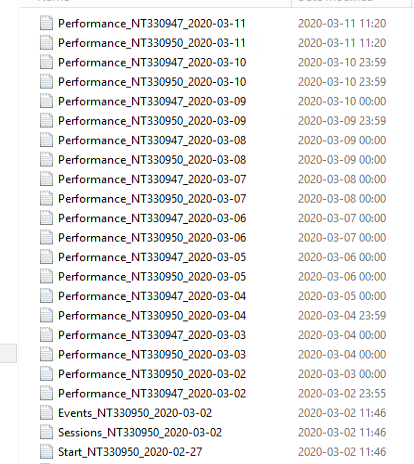
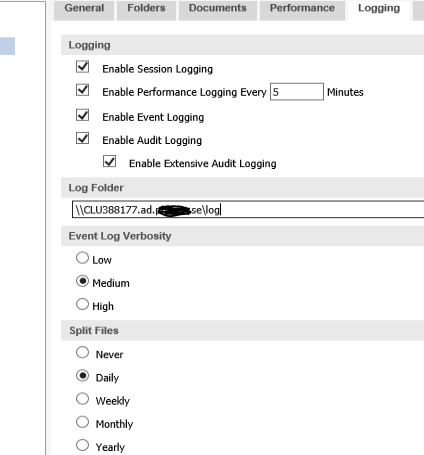
QlikView server stops writing Events and Sessions log:s to log folders 2020-03-02. Performence log:s works fine.
Does anyone know what is wrong?
We have disable the log and restart it, but it did'nt help

.png "Former Employee") Brett_Bleess
Brett_Bleess
- Mark as New
- Bookmark
- Subscribe
- Mute
- Subscribe to RSS Feed
- Permalink
- Report Inappropriate Content
I would look in the QVServer Settings.ini file to be sure things look correct there, that should be from where the QMC is getting the information it is displaying, but I would double-check to be sure things are good there just to be safe. The only other issue that it could be is a problem with the File Server/File Share, would confirm NTFS rights and Network Share permissions to be sure the Qlik Service Account has Full Control on the NTFS rights, the File Permissions I generally do Everyone Full Control given that is how Microsoft taught things back in the day. Windows uses most restrictive between the two to determine the access... Best I can offer with what you have provided.
Regards,
Brett
I now work a compressed schedule, Tuesday, Wednesday and Thursday, so those will be the days I will reply to any follow-up posts.
