Unlock a world of possibilities! Login now and discover the exclusive benefits awaiting you.

- Qlik Community
- :
- All Forums
- :
- QlikView
- :
- Qlikview File Loading
Options
- Subscribe to RSS Feed
- Mark Topic as New
- Mark Topic as Read
- Float this Topic for Current User
- Bookmark
- Subscribe
- Mute
- Printer Friendly Page
Turn on suggestions
Auto-suggest helps you quickly narrow down your search results by suggesting possible matches as you type.
Showing results for

Not applicable
2015-07-30
01:39 PM
- Mark as New
- Bookmark
- Subscribe
- Mute
- Subscribe to RSS Feed
- Permalink
- Report Inappropriate Content
Qlikview File Loading
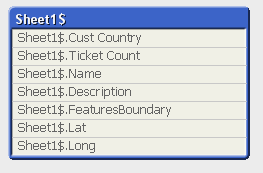
When I upload the excel file, Qlikview converts the columns as showing above. I need to remove "Sheer1$" from each column so that I can join it with other table containing Cust Country column. How do I do this? Please help
861 Views
1 Solution
Accepted Solutions

 marcus_sommer
MVP
2015-07-30
01:49 PM
- Mark as New
- Bookmark
- Subscribe
- Mute
- Subscribe to RSS Feed
- Permalink
- Report Inappropriate Content
This happens because there is somewhere a qualify statement within your script - use simply unqualify or remove the other statement.
Qualify *;
Unqualify *;
- Marcus
798 Views
2 Replies
marcus_sommer
MVP
2015-07-30
01:49 PM
- Mark as New
- Bookmark
- Subscribe
- Mute
- Subscribe to RSS Feed
- Permalink
- Report Inappropriate Content
This happens because there is somewhere a qualify statement within your script - use simply unqualify or remove the other statement.
Qualify *;
Unqualify *;
- Marcus
799 Views
Not applicable
2015-07-30
01:56 PM
Author
- Mark as New
- Bookmark
- Subscribe
- Mute
- Subscribe to RSS Feed
- Permalink
- Report Inappropriate Content
Cool, it works. Thank you Marcus 
798 Views