Unlock a world of possibilities! Login now and discover the exclusive benefits awaiting you.

- Qlik Community
- :
- All Forums
- :
- QlikView
- :
- Qlikview Governance Dashboard - 2012 R2?
- Subscribe to RSS Feed
- Mark Topic as New
- Mark Topic as Read
- Float this Topic for Current User
- Bookmark
- Subscribe
- Mute
- Printer Friendly Page

- Mark as New
- Bookmark
- Subscribe
- Mute
- Subscribe to RSS Feed
- Permalink
- Report Inappropriate Content
Qlikview Governance Dashboard - 2012 R2?
We would like to run the Governance Dashboard but unfortunately, our server OS is Windows Server 2012 R2 which isn't supported by Qlikview Desktop at the moment.
Can I run the dashboard from my local machine and just point the Dashboard at the folders where the log files are on the server or on a mapped drive to the server?
Thanks!

 Tyler_Waterfall
- Mark as New
- Bookmark
- Subscribe
- Mute
- Subscribe to RSS Feed
- Permalink
- Report Inappropriate Content
Ken,
Yes, you can run the dashboard from anywhere that can reach the desired log folders and file folders (just use file share paths and Governance Dashboard 1.1 SR1).
The more recent versions of QlikView Desktop 11.20 (SR2 and later) support Windows Server 2012.
Are you referring to the no officially stated support of the Governance Dashboard in Server 2012? (which is true).
We've had several customers use the Governance Dashboard with Server 2012. There is a known but unsolved issue related to the installation files and permissions put down by Microsoft that some customers have seen. However, as far as I can tell, this does not preclude you from using the Dashboard on Server 2012.
- Mark as New
- Bookmark
- Subscribe
- Mute
- Subscribe to RSS Feed
- Permalink
- Report Inappropriate Content
Tyler -
Thanks for the reply. We have been unable to run 11.20 SR7 on Windows Server 2012 R2. The installer will not run. It is true that there is support for Windows Server 2012 but not R2. 
Are there instructions on how to install the dashboard to work from a "remote" version of desktop?
Thanks,
Ken Hill
Tyler_Waterfall
- Mark as New
- Bookmark
- Subscribe
- Mute
- Subscribe to RSS Feed
- Permalink
- Report Inappropriate Content
This is a bit out of my area of knowledge - however, from what I gather in the Release notes, support for Server 2012 R2 was added in SR6. See https://d1cf4w4kkla6tb.cloudfront.net/qlikview/11.20/12451/QlikView%2011.2%20build%2012451%20SR7%20R...
I'm not sure I know what you mean by "remote version of desktop". Do you want to open the Governance Dashboard on your local machine (using qv.exe) and reload it there? As long as you can access the log folders and folders containing the source documents you want to scan, there is no problem doing this - with the caution that scanning files across a network adds time to the reload.
In that case, just use the folder path you would normally use to access those folders. For example, use \\ServerName\sharedfolderName\QlikViewServer\ or \\ServerName\c$\programdata\QlikView\QlikViewServer.
Is this what you are trying to do?
- Mark as New
- Bookmark
- Subscribe
- Mute
- Subscribe to RSS Feed
- Permalink
- Report Inappropriate Content
Hi,
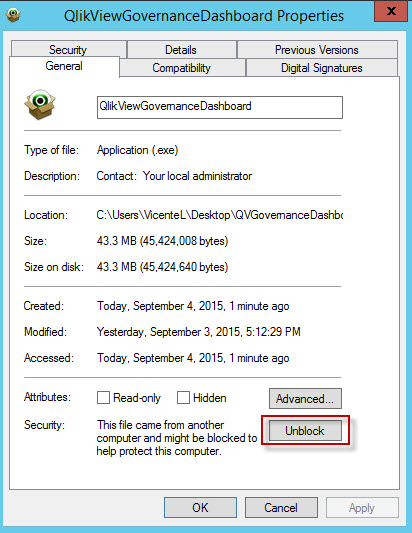
I was able to install it on Windows Server 2012 R2. We constantly run into files not installing. The reason is 2012 will block executables. Before you run the installer you will need to unblock the file and the run it as administrator.