Unlock a world of possibilities! Login now and discover the exclusive benefits awaiting you.

- Qlik Community
- :
- All Forums
- :
- QlikView
- :
- Qlikview Management Service Stopped Frequentely
- Subscribe to RSS Feed
- Mark Topic as New
- Mark Topic as Read
- Float this Topic for Current User
- Bookmark
- Subscribe
- Mute
- Printer Friendly Page

 its_anandrjs
- Mark as New
- Bookmark
- Subscribe
- Mute
- Subscribe to RSS Feed
- Permalink
- Report Inappropriate Content
Qlikview Management Service Stopped Frequentely
Dear All,
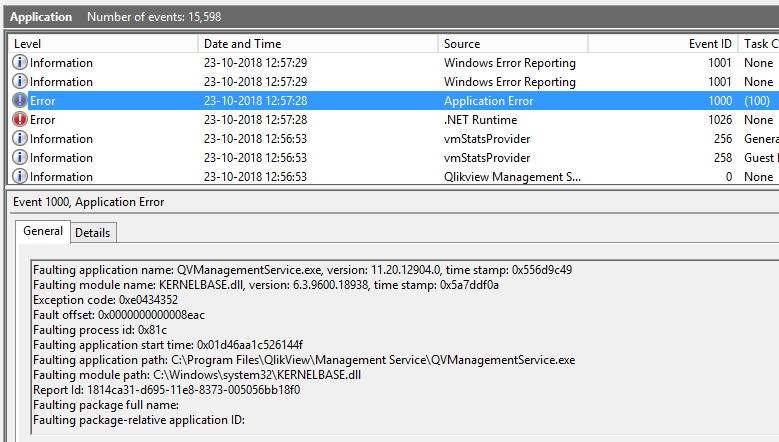
Why on Qlikview server service named "Qlikview Management Service" get stopped frequently also which is set on automatic restart as well.
Attached are some snaps for error logs please have a look.

Regards,
Anand

 Gysbert_Wassena
- Mark as New
- Bookmark
- Subscribe
- Mute
- Subscribe to RSS Feed
- Permalink
- Report Inappropriate Content
That's a rather old version you're running. Try updating it to SR17. If that's not an option check if a recent windows update or a changed system configuration can have caused this. Perhaps a .Net repair will help.
talk is cheap, supply exceeds demand
its_anandrjs
- Mark as New
- Bookmark
- Subscribe
- Mute
- Subscribe to RSS Feed
- Permalink
- Report Inappropriate Content
Dear All,
Any update on the above question.
Regards,
Anand
its_anandrjs
- Mark as New
- Bookmark
- Subscribe
- Mute
- Subscribe to RSS Feed
- Permalink
- Report Inappropriate Content
Thanks gwassenaar,
Yes it seems to me also, one more thing reload task which is schedule are working fine but QMC is not accessible. Is there any way i get access with any new port number with the attached url.

 Chip_Matejowsky
- Mark as New
- Bookmark
- Subscribe
- Mute
- Subscribe to RSS Feed
- Permalink
- Report Inappropriate Content
Suggest you configure the Management Service logging to debug level in QMC > System > Setup > Management Service > Genera tab, let the logs collect for a bit and then review them. Post them to this thread if you have specific questions. Good luck!
Help users find answers! Don't forget to mark a solution that worked for you!
its_anandrjs
- Mark as New
- Bookmark
- Subscribe
- Mute
- Subscribe to RSS Feed
- Permalink
- Report Inappropriate Content
Hi All,
I rectify this problem by repairing the existing environment specially metadata, .NET framework.
Regards,
Anand
