Unlock a world of possibilities! Login now and discover the exclusive benefits awaiting you.

- Qlik Community
- :
- All Forums
- :
- QlikView
- :
- Qlikview performance of Access point
- Subscribe to RSS Feed
- Mark Topic as New
- Mark Topic as Read
- Float this Topic for Current User
- Bookmark
- Subscribe
- Mute
- Printer Friendly Page

 khalander
- Mark as New
- Bookmark
- Subscribe
- Mute
- Subscribe to RSS Feed
- Permalink
- Report Inappropriate Content
Qlikview performance of Access point
Hi Everyone,
We are facing one issue in qlikview access point. One dashboard is taking more time to open the document at access point.
We have enabled Preload option in QMC and after checking that option document is opening little bit faster. But it getting disable once services restarted or Document is reloaded. Could you please help us how to enable preload option permanently.
Thanks,
Khalander

- Mark as New
- Bookmark
- Subscribe
- Mute
- Subscribe to RSS Feed
- Permalink
- Report Inappropriate Content
Hi,
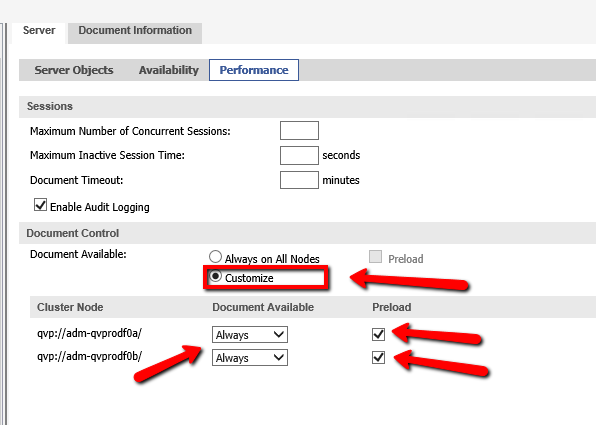
You have to choose "Customize" option and than set "Always" in "Document Available".
Setting performed under Documents-->Source Documents-->App-->Distribution Task-->Server-->Performance-->Document Control-->Customize-->Cluster Node-->Document Available-->Always-->Preload