Unlock a world of possibilities! Login now and discover the exclusive benefits awaiting you.

Announcements
Share your agentic AI experience, learn from others, and earn a new badge: Put Agentic AI to Work
- Qlik Community
- :
- All Forums
- :
- QlikView
- :
- Ranking Calculation in QlikView
Options
- Subscribe to RSS Feed
- Mark Topic as New
- Mark Topic as Read
- Float this Topic for Current User
- Bookmark
- Subscribe
- Mute
- Printer Friendly Page
Turn on suggestions
Auto-suggest helps you quickly narrow down your search results by suggesting possible matches as you type.
Showing results for

Anonymous
Not applicable
2015-11-08
06:21 AM
- Mark as New
- Bookmark
- Subscribe
- Mute
- Subscribe to RSS Feed
- Permalink
- Report Inappropriate Content
Ranking Calculation in QlikView
I have the following data in a straight table:
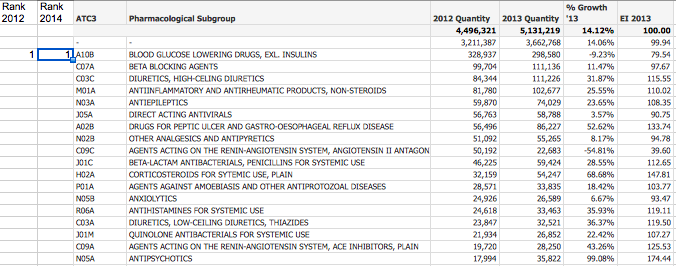
I need to be able to calculate 2012 and 2013 rankings based on the '2012 Quantity' and '2013 Quantity'. How can this be accomplished in QlikView? Please see attached sample application.
Regards.
1,440 Views
1 Solution
Accepted Solutions

 swuehl
Champion III
2015-11-08
06:35 AM
- Mark as New
- Bookmark
- Subscribe
- Mute
- Subscribe to RSS Feed
- Permalink
- Report Inappropriate Content
Maybe just use expressions like
=Rank(TOTAL Sum ({$<Year={2012},Month=>} QTY))
3 Replies
swuehl
Champion III
2015-11-08
06:35 AM
- Mark as New
- Bookmark
- Subscribe
- Mute
- Subscribe to RSS Feed
- Permalink
- Report Inappropriate Content
Maybe just use expressions like
=Rank(TOTAL Sum ({$<Year={2012},Month=>} QTY))
Anonymous
Not applicable
2015-11-08
09:20 AM
Author
- Mark as New
- Bookmark
- Subscribe
- Mute
- Subscribe to RSS Feed
- Permalink
- Report Inappropriate Content
Thank you Swuehl, this works well
1,241 Views

 psankepalli
Partner - Creator III
2015-11-08
09:33 AM
- Mark as New
- Bookmark
- Subscribe
- Mute
- Subscribe to RSS Feed
- Permalink
- Report Inappropriate Content
Thank you Swuehl, This explains well on Rank Function
1,241 Views